¿Estás cansado de jugar al escondite con clientes potenciales? ¿Quieres mejorar tu juego y conectar con las personas adecuadas? ¡No busques más allá de LinkedIn Sales Navigator!
Esta herramienta de prospecting cambia las reglas del juego para cualquiera que busque comercializar sus services o construir relaciones significativas con profesionales de la industry. Además, con casi todo el mundo y su abuela (literalmente) en LinkedIn hoy en día, no te faltarán prospects.
En este LinkedIn Sales Navigator tutorial, te mostraremos cómo aprovechar las LinkedIn Sales Navigator Key Features y cerrar ese próximo gran deal, hacer valuable connections o mantenerte al tanto de las company updates.
Como una LinkedIn lead generation tool, Sales Navigator se destaca por su precisión y características completas. A diferencia de los métodos genéricos de lead generation, Sales Navigator te permite enfocar tu search con precisión láser basándose en criteria específicos como industry, job title, company size, e incluso years of experience. Este level de granularity asegura que te estás conectando con los most relevant prospects para tu business. Más allá de solo encontrar leads, esta LinkedIn lead generation tool te ayuda a nurture relationships al proporcionar insights sobre las activities e interests de tus prospects, enabling personalized outreach. Al usar Sales Navigator, puedes transformar tu presencia en LinkedIn de un profile pasivo a un motor activo de lead generation, impulsando leads más cualificados y, en última instancia, más sales.
¡No dejes que los métodos anticuados te detengan, saltemos al futuro de las sales!
¿Qué es LinkedIn Sales Navigator?
LinkedIn Sales Navigator no es solo una mejora; ¡es una versión turboalimentada de LinkedIn, repleta de advanced features que transforman el networking ordinario en oportunidades extraordinarias!
Imagina esto: estás en la búsqueda de un CEO en la Software Industry, residente en el Reino Unido, educado en Oxford University, con precisamente 4 years de experience y un recent job change. ¿Imposible? ¡No con Sales Navigator!
Con sus advanced filters, tu search se transforma en una highly targeted mission.
Pero no se detiene ahí. Sales Navigator no se trata solo de encontrar a tu ideal customer; es tu secret weapon para el prospecting de company accounts. ¿Y la real magic? ¡Puedes enviar messages a personas fuera de tus LinkedIn connections!
Además, te mantiene al tanto con real-time updates tanto de company pages como de saved individuals.
Sales Navigator es como tener un indefatigable personal assistant a tu service, trabajando incansablemente para traerte los best leads y connections.
¿Y adivina qué? Sales Navigator se vuelve imparable cuando se combina con game-changers like Scrupp.
Al considerar el Navigators software, es importante reconocer el robusto ecosystem que proporciona para los sales professionals. Esto no se trata solo de encontrar names y titles; se trata de obtener una competitive edge a través de data-driven insights. El software offers advanced search filters, personalized lead recommendations, y real-time updates sobre tus target accounts, empoderándote para adaptar tu outreach y messaging para un maximum impact. Furthermore, el Navigators software se integra perfectamente con otras sales tools y CRMs, simplificando tu workflow y asegurando que todas tus sales activities estén aligned. Al leveraging el full potential de esta platform, puedes transformar tu sales process de un guessing game a un strategic, targeted effort, impulsando en última instancia más qualified leads y cerrando más deals.
¿Sabías que las empresas que utilizan LinkedIn Sales Navigator experimentan un promedio de un 18% más de growth de pipeline? Según los propios datos de LinkedIn, los usuarios de Sales Navigator también ven un deal size un 33% mayor. Esto la convierte en una poderosa linkedin lead generation tool para businesses que buscan scale their sales efforts. Fuente: LinkedIn Sales Solutions.
Con Scrupp, exporting profile data y encontrar verified emails se vuelve pan comido, haciendo tu trabajo no solo más fácil sino también increíblemente eficiente. (¡Cubriremos esta joya en detalle más adelante en este artículo!)
¿Quién debería usar LinkedIn Sales Navigator?
LinkedIn Sales Navigator está dirigido a una audiencia profesional, lo que lo hace inadecuado para aquellos que buscan interacciones sociales casuales o citas.
Es esencial adoptar un comportamiento profesional al utilizar esta platform, avoiding casual discussions o debates on topics like politics o religion.
Sales Navigator Benefits:
- Targeted Lead Generation: Advanced filters ayudan a encontrar ideal prospects.
- Real-time Insights: Mantente actualizado sobre leads y accounts.
- Relationship Building: Facilita meaningful connections.
- Efficient Outreach: Personalized messaging para mayor engagement.
- CRM Integration: Streamlines sales workflow.
Los sistemas CRM populares que se integran perfectamente con LinkedIn Sales Navigator incluyen Salesforce, HubSpot, Microsoft Dynamics 365 y Oracle Sales Cloud. Esta integration permite a los sales teams sincronizar lead data, track interactions, y gestionar su pipeline de manera más eficiente directamente dentro de su CRM.
Sales Navigator se erige como un indispensable asset para los sales professionals que confían en el social selling y el relationship building. Sus robustas features streamline lead generation y account management, resultando invaluable para sales teams y organizations.
Particularmente ventajoso para B2B sales experts que targeted specific industries o job roles, Sales Navigator facilita la precisión en sus outreach efforts.
Además, aquellos que buscan hacer crecer su professional network y desarrollar meaningful connections pueden utilizar Sales Navigator en toda su extensión. Es una potente tool para nurturing valuable professional relationships y unlocking fresh opportunities.
Muchos users se encuentran escribiendo mal la tool como sales navigor, pero independientemente del typo, la intención sigue siendo la misma: aprovechar el poder de LinkedIn para un enhanced sales prospecting. Ya sea que lo llames sales navigor o Sales Navigator, comprender sus features y functionalities es key para maximizar su potential. La tool proporciona advanced search capabilities, lead recommendations, y real-time insights, todo diseñado para ayudar a los sales professionals a connect con los right prospects y close more deals. Así que, aunque la ortografía correcta es Sales Navigator, no dejes que un simple typo te impida explorar los valuable resources que ofrece.
LinkedIn Sales Navigator Key Features
Desglosemos LinkedIn Sales Navigator usando ejemplos prácticos y pasos sencillos.
Imagina que estoy en la B2B industry, vendiendo services a otras businesses, y quiero encontrar potential clients y crear valuable connections. ¿Cómo lo haría?
Primero, necesito definir mi ideal customer. Ofrezco una AI tool basada en SaaS adaptada para social media managers en medium-sized US-based IT companies.
Aquí están los criteria para mi ideal customer:
- - Job title: Social Media Manager
- - Industry: Information & Technology
- - Country: United States
- - Company Size: 51 to 200 employees
Ahora, ¿cómo uso Sales Navigator para esto? Usaría la LinkedIn Sales Navigator Filters Feature.
¿Cómo usar LinkedIn Sales Navigator Leads y Lead Filters?
Para acceder a los important user data, haré clic en "Leads" y luego en "Lead filters" para usar advanced filters.

Basándome en mi ideal customer profile, aplicaré filters. Hay 25+ filters disponibles para narrow down prospects.
Con Sales Navigator, generé una list de 948 potential customers.
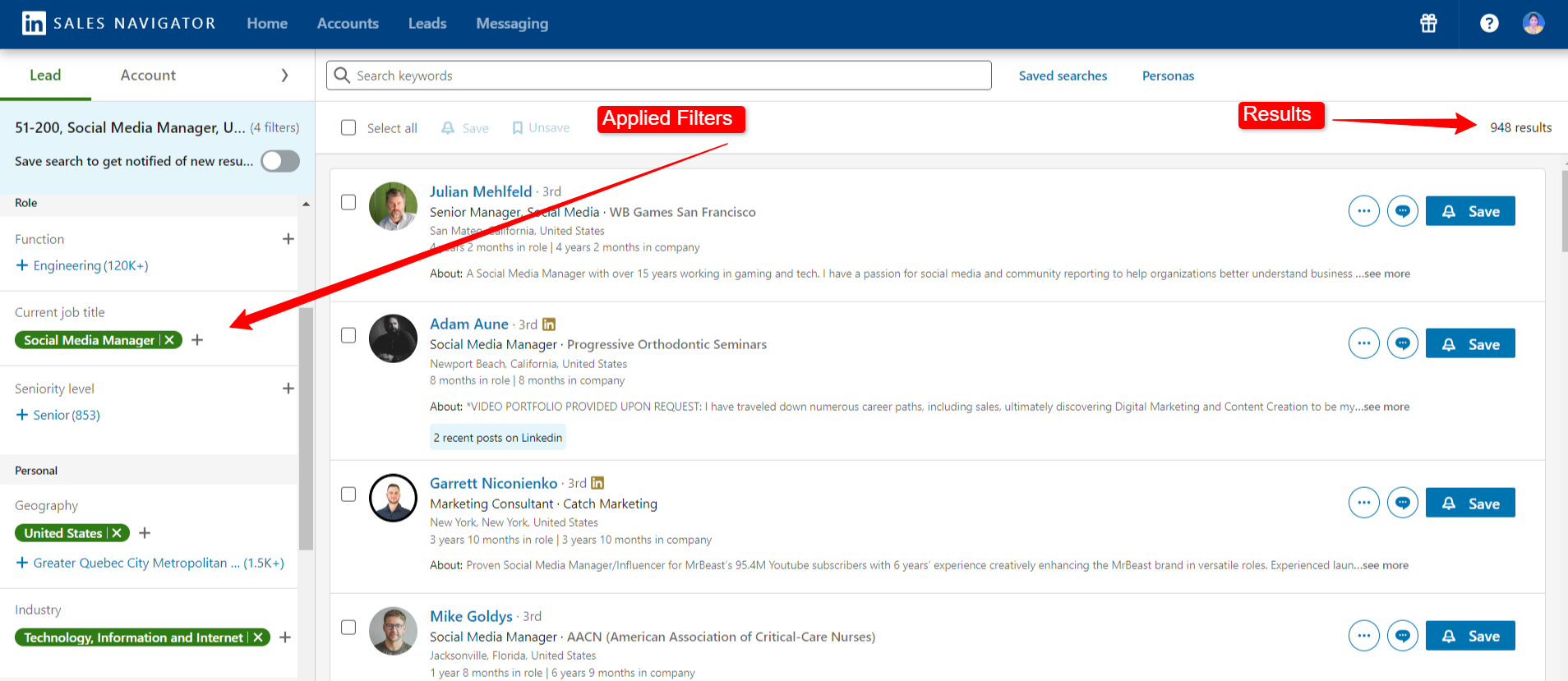
Desde aquí, puedo hacer clic en profiles y save los right fits para mi business, haciendo mis sales efforts más targeted y efficient.
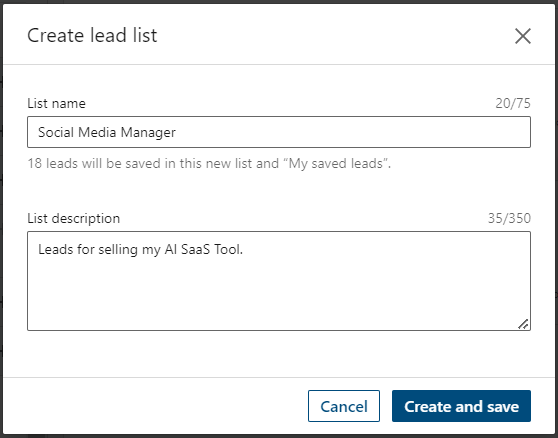
Puedes save leads en una existing list o create una new one. Haré una new list llamada "Social Media Managers."
Ahora, discutamos brevemente otros important filters:
I) Current Company: Encuentra prospects en specific companies, como alguien en Google.
II) Past Company: Encuentra personas que trabajaron en el past para una specific company, e.g., alguien que trabajó para Google.
III) Company Headquarters Location: Target prospects basados en company headquarters.
IV) Company Type: Filter companies por type, como NGO, Public Company, etc.
V) Function: Search people en different departments como Marketing, IT, etc.
VI) Seniority Level: Encuentra personas basadas en experience, como Entry Level o Director.
VII) Years of Experience: Target people basados en su experience, desde newcomers hasta veterans.
VIII) School: Encuentra personas de specific colleges, e.g., University of Oxford.
IX) Buyer Intent: Identify potential leads interesados en tu product, como aquellos following your company page.
X) Recent Updates: Filter prospects basados en activity, como recent posts o job changes.
Al principio, hiciste clic en la 'Leads' tab para acceder a la filter option, ¿verdad? Así es como se ve la interface cuando haces eso.
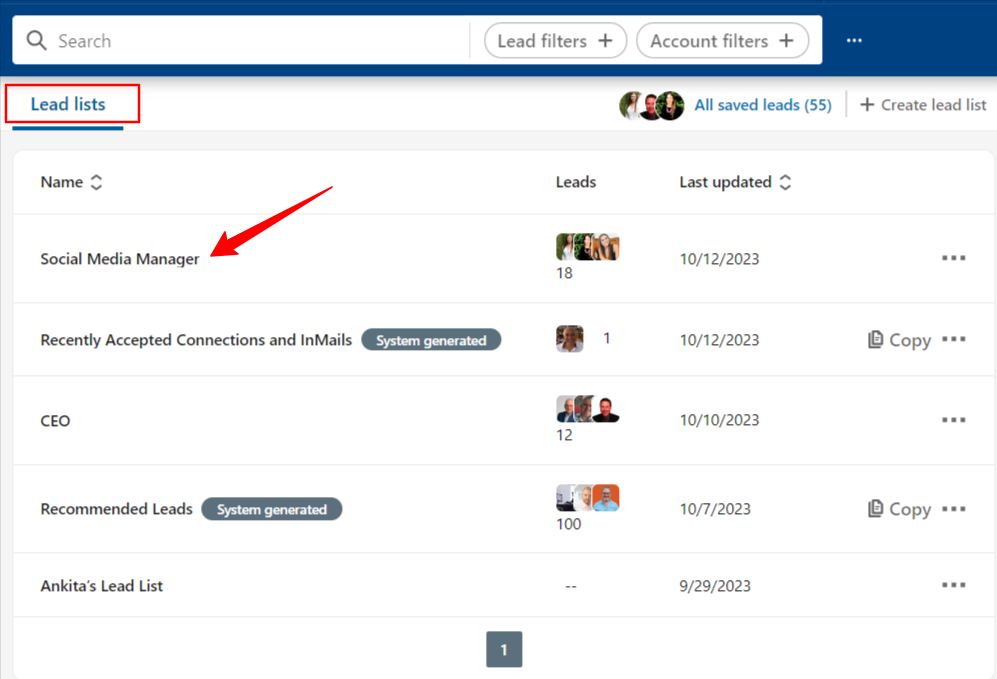
Verás todas tus saved leads list aquí.
Por ejemplo: Guardamos la ''Social media manager'' list. Eso lo podemos ver aquí. Esta es solo la forma de manage your ideal prospects en un solo lugar y keep a track of their activities.
Cuando hagas clic en cualquiera de las saved lead list, verás la below interface.
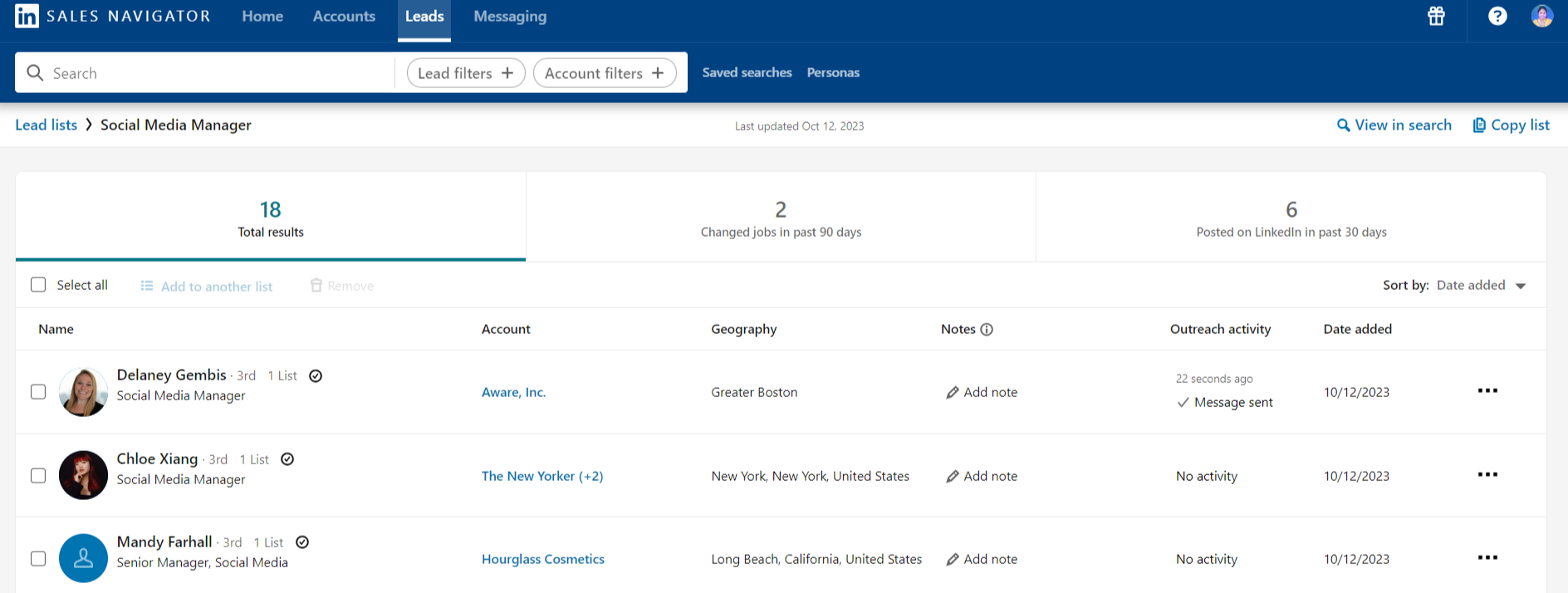
Muestra key details como tu last interaction (e.g., un message), cualquier notes que hayas añadido, job changes, o updates a sus LinkedIn posts.
Si haces clic en cualquier particular profile, obtendrás more information sobre su education, past job experience incluyendo ''Timeline'' que muestra tu past history con esa person, en términos de when you messaged them, when you added them in the list etc.
Así que esto fue todo sobre leads y lead filters.
Ahora, esto fue a nivel Individual, ¿Qué pasa si quieres hacer lo mismo pero con los company data?
Puedes hacer todo eso con Accounts y Account filters. Veamos cómo.
¿Cómo usar LinkedIn Sales Navigator Accounts y Account Filters?
Imagina que estás buscando small to medium-sized IT companies que ganan entre 1 y 10 million dollars anualmente y currently hiring.
¿Podemos filter annual sales en Sales Navigator? ¡Sí! Sales Navigator te permite filter accounts basados en annual revenue, entre muchos otros criteria. Esta es una key feature para identifying companies que se ajustan a tu target market.
Aquí te mostramos cómo puedes hacerlo:
I) Go to Account Filters: Haz clic en la 'Accounts' tab y luego selecciona 'Account Filters' .
II) Apply the Filters: Set the filters de la siguiente manera:
- - Annual Revenue: $1 million to $10 million
- - Company Headcount: 11-50
- - Industry: Technology, Information, and Media
- - Job Opportunities: Hiring on LinkedIn
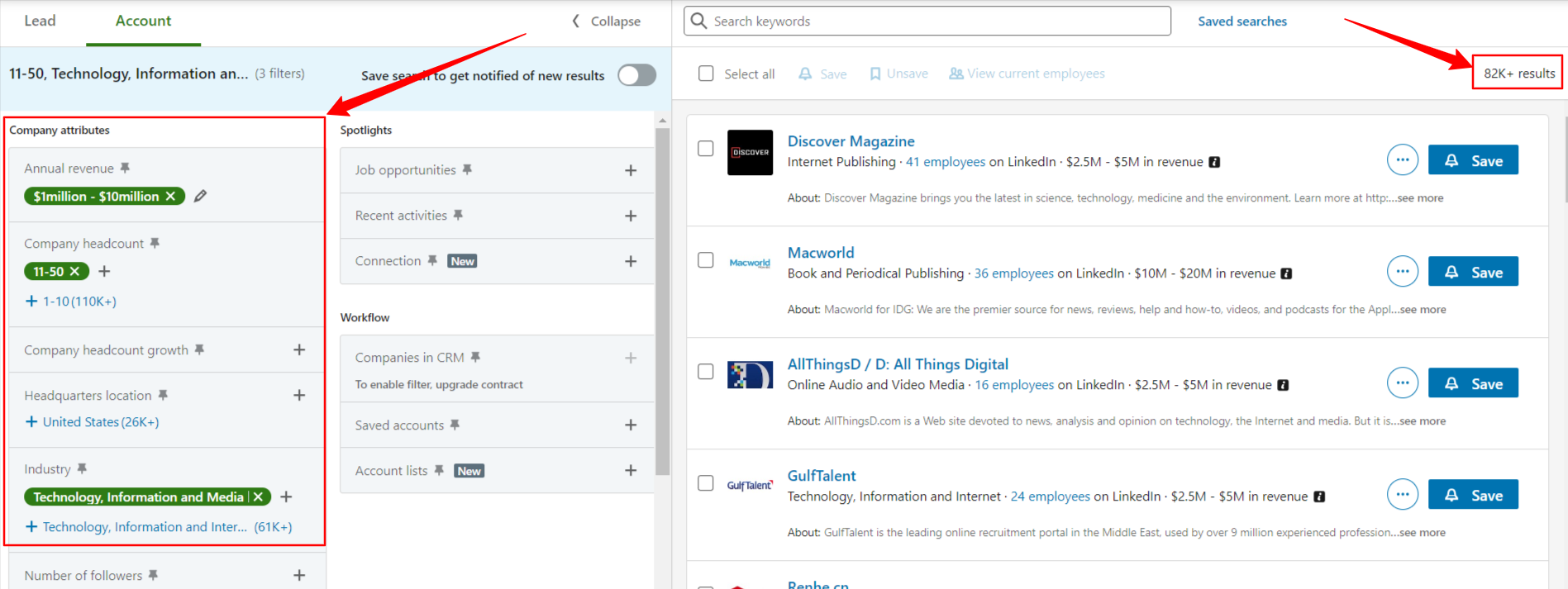
Con estos filters, encontré más de 82,000 results.
Puedes further refine esta list usando additional filters.
Exploremos esas options a continuación.
I) Headquarters Location: Filter companies basadas en la location de sus headquarters.
II) Number of Followers: Filter companies basadas en el number of followers en su LinkedIn company page.
III) Department Headcount: Encuentra companies con specific department sizes. Por ejemplo, locate companies con 50 employees en el account department.
IV) Company & Department Headcount Growth: Determine el percentage increase o decrease en employees. Analyze overall headcount growth o department-specific changes. Por ejemplo, identify companies con un 50% increase en su headcount.
Una vez que hayas identified suitable companies, es hora de save their accounts.
Select las desired companies y haz clic en 'SAVE.' Puedes either add them a una existing list o create una new one.
Para view your saved company list y important data, return a la account tab.
Aquí, puedes access your saved companies, add notes, y monitor growth and risk alerts (e.g., increased hiring, fundraising, o layoffs).
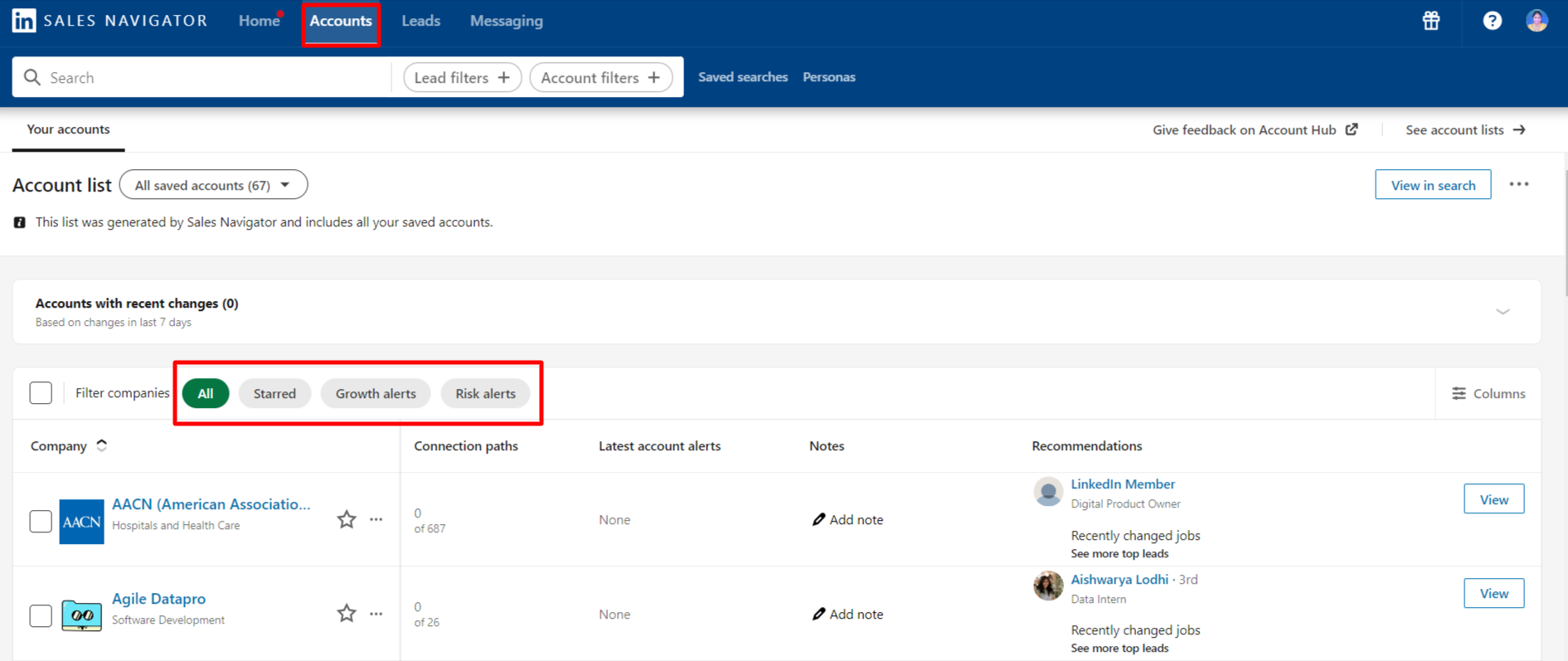
Cuando haces clic en una specific company, descubrirás additional options para enhance your prospecting journey.
Pero antes de explorar further, profundicemos en otra essential feature: Personas.
¿Qué es Personas en LinkedIn Sales Navigator?
En simple terms, una Persona es una specific audience que target para sales o relationship-building.
Todo lo que haces es usar los filters que ya vimos en la leads section: Function, Job Title, Seniority Level y Geography.
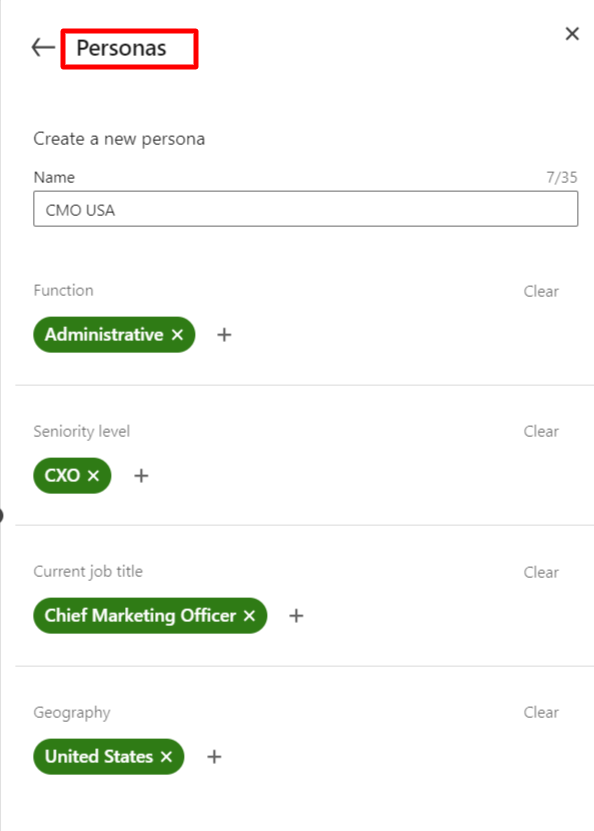
Por instance, una Persona podría ser:
- - Name: CMO USA
- - Function: Administrative
- - Seniority Level: CXO
- - Current Job Title: Chief Marketing Officer
- - Geography: United States
LinkedIn Sales Navigator usa este data para recommend matching leads. También puedes apply personas en la leads filter section y relationship explorer para connect con los right prospects.
Volvamos a la accounts y account filters section. Cuando haces clic en una specific company, obtienes más insights a través de three crucial tabs:
People, Insights, y Alerts.
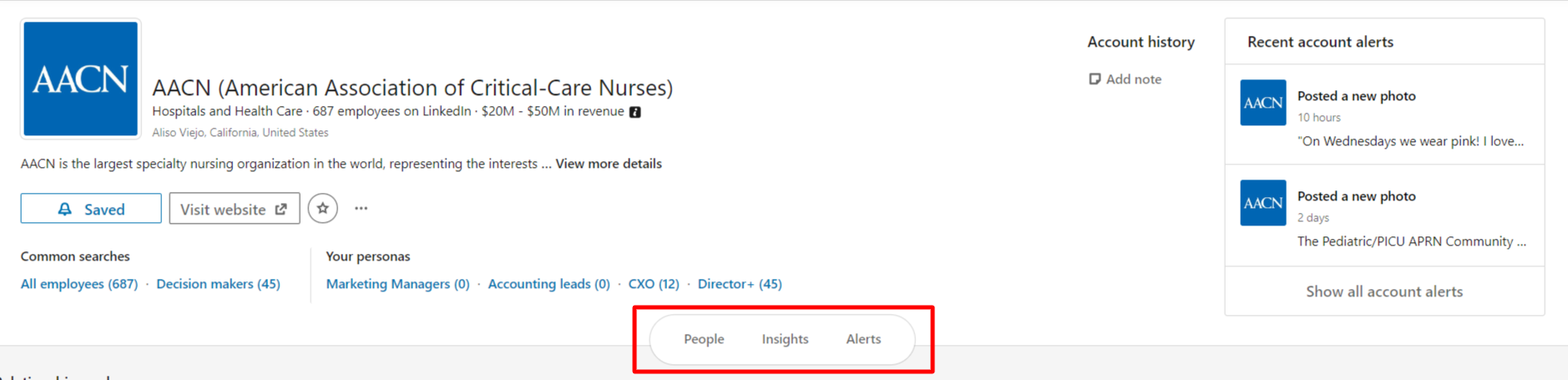
Comenzando con la People tab, alberga las Relationship Explorer y Relationship Map features.
¿Qué es Relationship Explorer en Sales Navigator?
En LinkedIn Sales Navigator, el Relationship Explorer es una feature que ayuda a los users a identify y connect con key individuals dentro de una targeted company.
Opera basándose en los user's specified criteria, highlighting top professionals dentro de la company que son likely valuable connections.
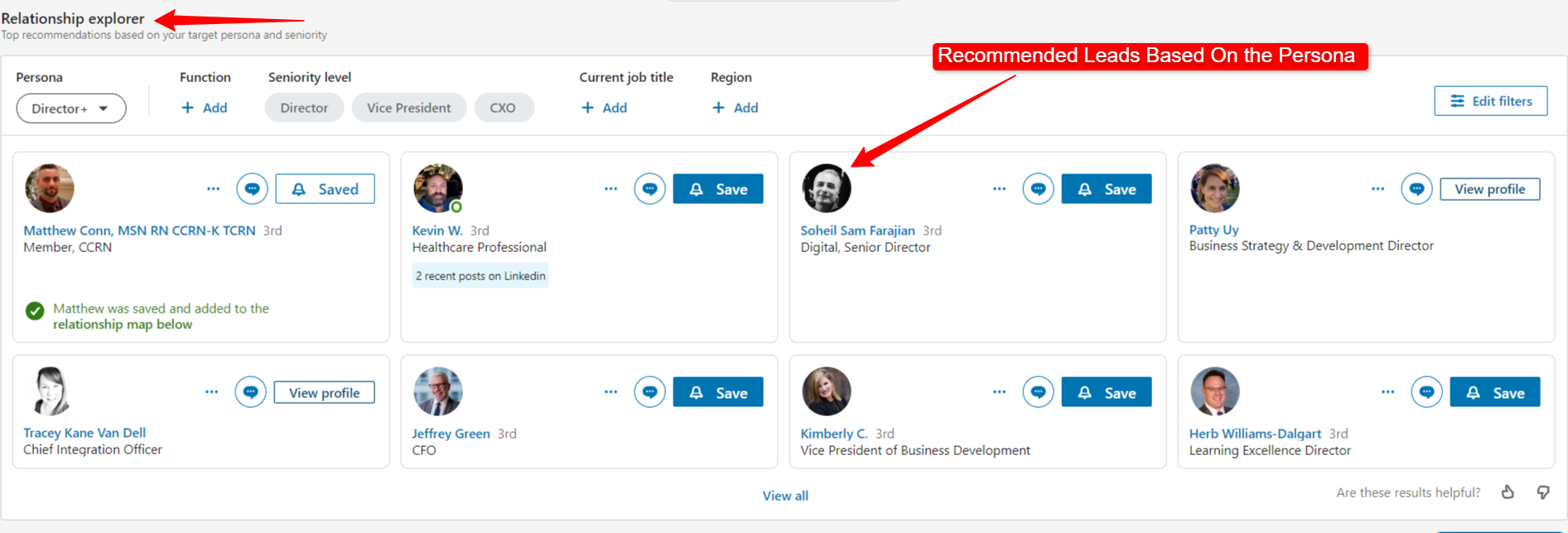
Al aprovechar el Relationship Explorer, los sales professionals pueden enfocar sus efforts en building relationships con los most relevant decision-makers e influencers, enhancing their prospecting y outreach strategies.
¿Qué es Relationship Map en Sales Navigator?
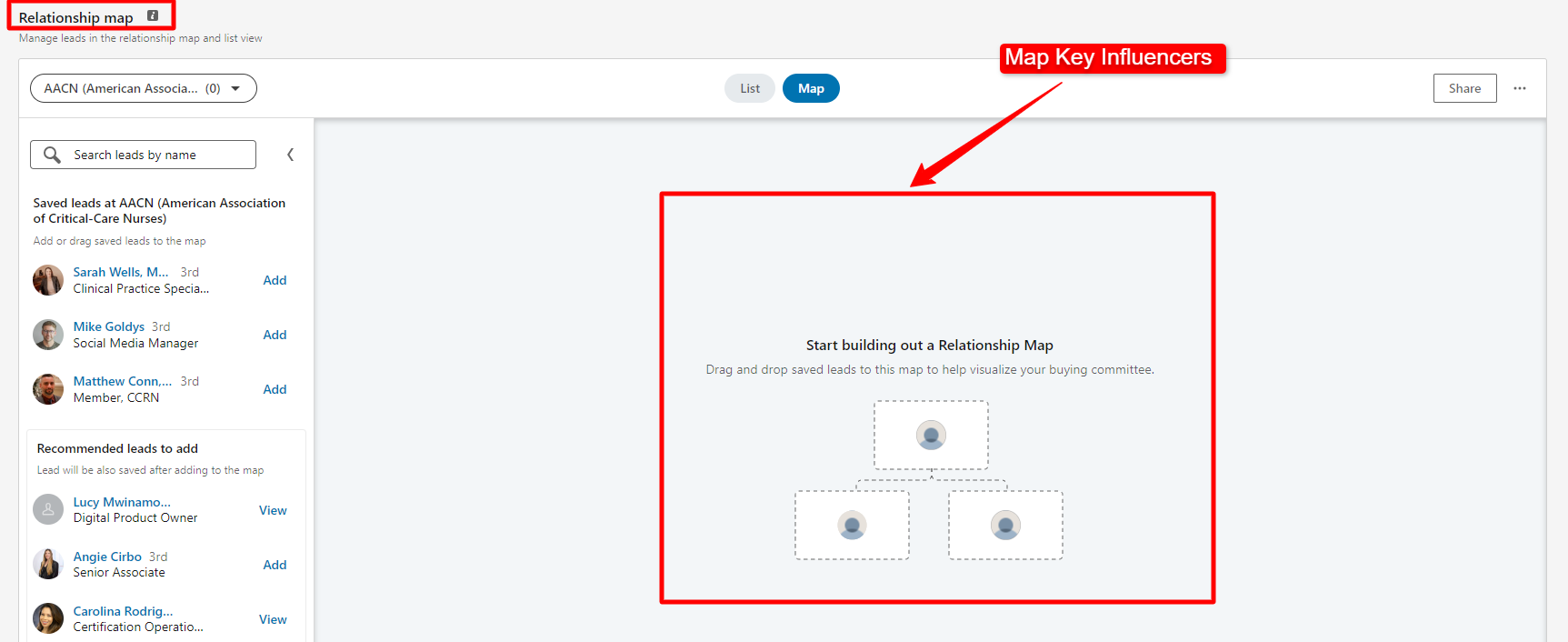
El Relationship Map en LinkedIn Sales Navigator te ayuda a organize your important leads de una company. Puedes:
- - Label Roles: Identify si son decision-makers, influencers, champions, etc.
- - Delegate Leads: Assign leads a colleagues para action.
- - Rate Relationship Strength: Mark your connection's strength (Strong, Medium, o Weak).
- - Add Notes: Keep track de sus latest activities.
Hablemos de la second tab llamada Insights, te da algunos important stats sobre la company.
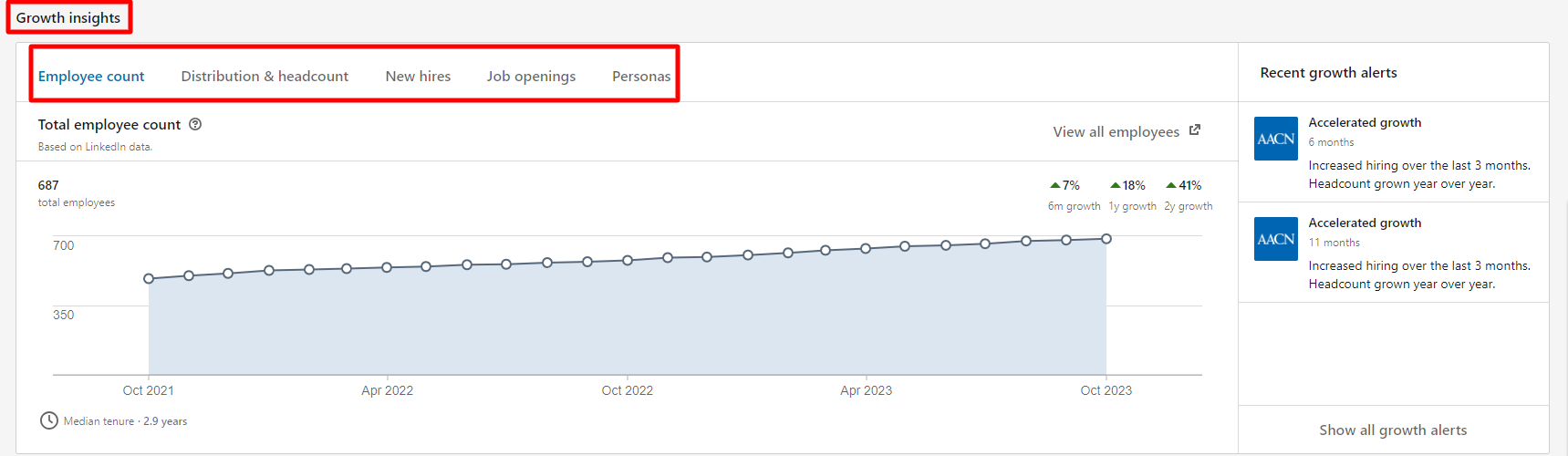
Aquí es lo que puedes find:
I) Employee Count: Esto displays el year-by-year growth o decline en la company's workforce.
II) Distribution and Headcount: Easily monitor changes en employee numbers across various functions. For instance, you might notice a 17 percent increase en healthcare services employees (like at AACN Company).
III) New Hires: Esto shows el number of new recruits la company brought in durante un specific month.
IV) Total Job Openings: Keep track de qué function o department dentro de la company ha increased o decreased their hiring rate.
Estos insights proporcionan un comprehensive overview, allowing you to gauge la company's growth, hiring patterns, y workforce distribution con ease.
Exploremos la final tab, Alerts. Just as the name implies, esta tab delivers various alerts para la company que has saved en Sales Navigator.
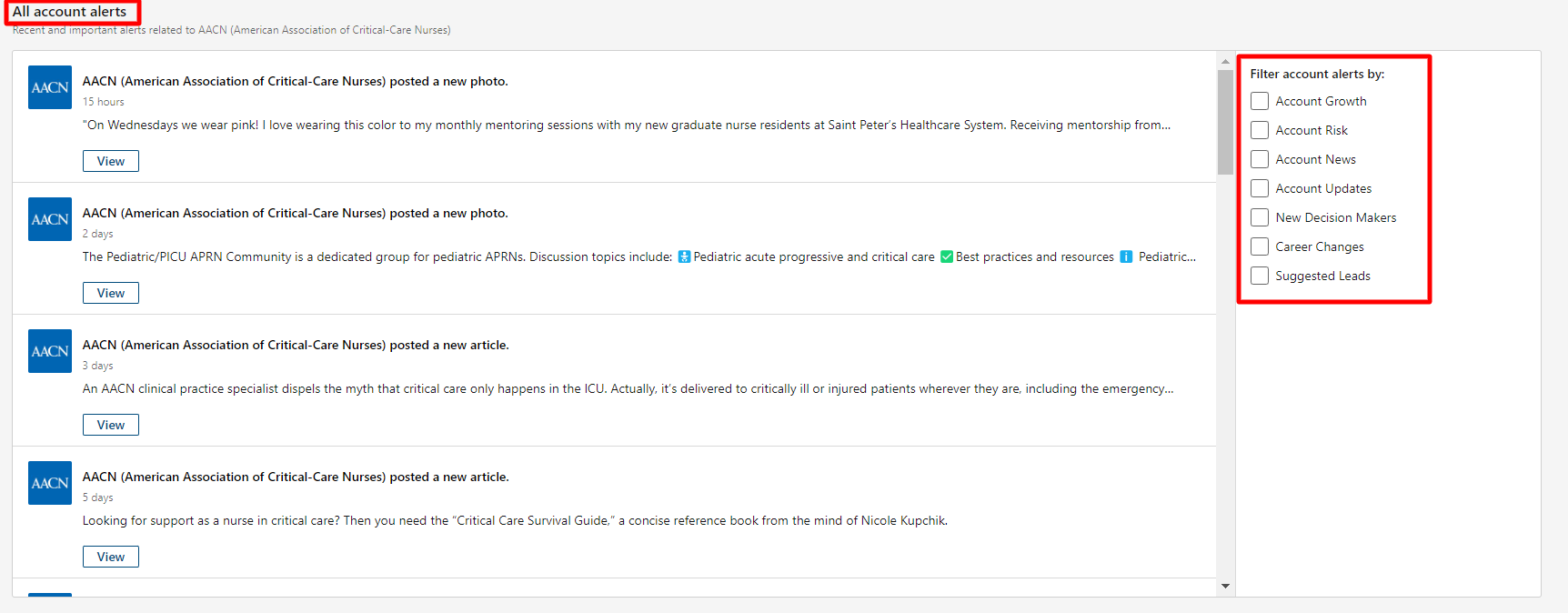
Aquí es lo que puedes keep track of:
I) Account Growth: Stay informed sobre changes en la company's size y expansion efforts.
II) Account Risk: Receive alerts regarding potential risks associated con la saved company.
III) Account News: Get updates on recent news related a la company.
IV) Account Updates: Stay in the loop about any updates o changes happening within la company.
V) New Decision Makers: Be alerted cuando new key decision-makers join la company.
VI) Career Changes: Get notifications cuando individuals de la saved company make career changes.
VIII) Suggested Leads: Receive recommendations para potential leads basados en la saved company's activity y connections.
Estos alerts te empower con real-time information, enabling you to make timely y informed sales decisions.
Example: Imagine you receive an alert that a key decision-maker at one of your target accounts has recently changed jobs. This is a perfect opportunity to reach out, congratulate them on their new role, and subtly introduce your product or service as a solution to their potential new challenges.
¿Qué es Messaging y InMail en LinkedIn Sales Navigator?
Understanding the LinkedIn sponsored messages cost is crucial para budget planning. El pricing model para LinkedIn sponsored messages, also known as Message Ads, typically operates on a cost-per-send (CPS) o cost-per-impression (CPM) basis. Factors influencing the LinkedIn sponsored messages cost include audience targeting, bid strategy, y message quality. Highly specific targeting can increase costs debido a una smaller, more valuable audience. Experimenting con different bidding options y closely monitoring campaign performance will help optimize your budget. Crafting compelling y relevant messages can improve engagement rates, ultimately lowering your cost per conversion. Always review LinkedIn's advertising guidelines para ensure compliance y maximize the impact of your sponsored message campaigns.
LinkedIn Sales Navigator offers robust messaging tools designed para streamline your communication efforts.1. Messaging Tab
I) Efficient Tracking: La Messaging tab serves como tu communication hub, allowing you to track all past conversations. Respond swiftly a new messages directamente desde esta section, ensuring timely interactions con tus connections.
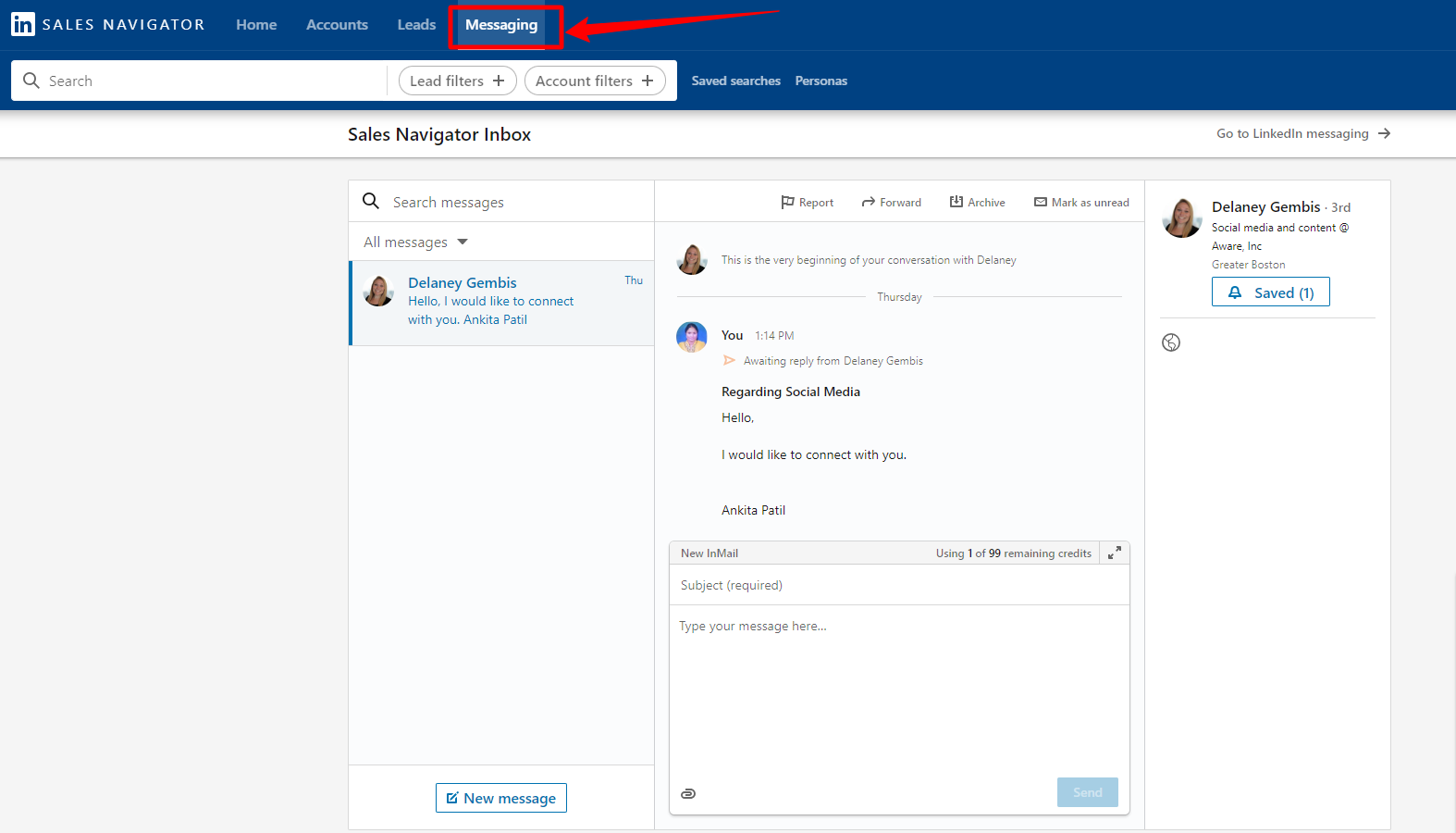
II) InMail Functionality
InMail es tu gateway para reaching out a potential leads. Cuando envías un message a un lead, un popup box te prompts a craft your subject line y main message.
LinkedIn provides approximately 50 InMail credits per month, allowing you to message individuals que no están yet connected contigo. Es un finite resource, emphasizing the importance of strategic communication.
Para aquellos que han accepted your connection request, no necesitas any credits para message them.
¿Qué es Social Selling Index en LinkedIn Sales Navigator?
Muy parecido a como un credit score gauges nuestra financial health, LinkedIn ofrece una similar metric llamada Social Selling Index (SSI) a través de su Sales Navigator.
Este score reveals how effectively you're leveraging LinkedIn para promote your products o services a la right audience.
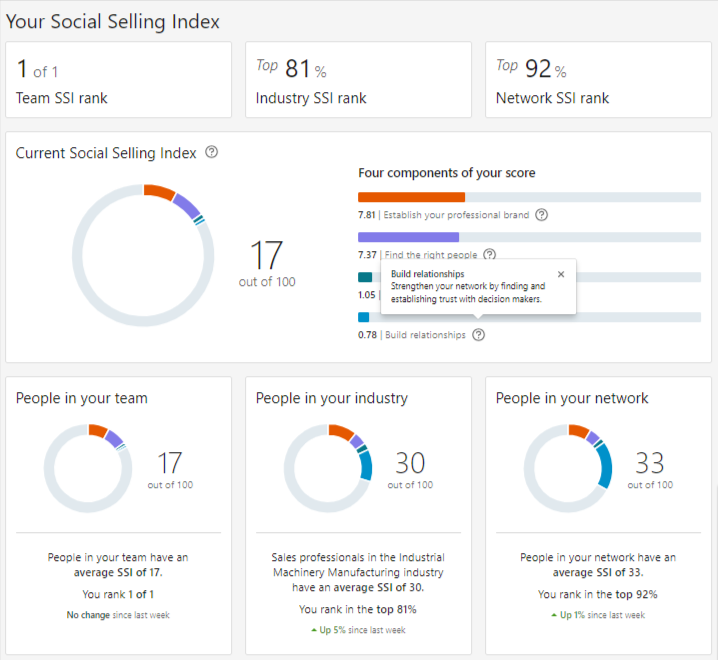
El Social Selling Index Score como tal no tiene direct benefits que puedas measure pero puede help LinkedIn recommend you leads que closely match your desire audience.
¿Por qué Focus en Improving Your SSI?
Improving your Social Selling Index significa strengthening your LinkedIn brand. Al refining your profile, connecting con la right people, y sharing valuable content, you lay the foundation for a thriving business.
Estas actions enhance your visibility, credibility, y trust, nurturing valuable connections y fruitful opportunities.
Factors Influencing Your SSI Score
Several factors influence your SSI score:
I) Optimized LinkedIn Profile: La completeness y relevance de tu profile juegan un pivotal role.
II) Strategic Connections: La quality y relevance de tus LinkedIn connections son integral a tu SSI.
III) Engagement y Meaningful Posts: Regular, meaningful posts y active engagement con tu network enhance your score.
IV) Utilization of Research Tools: Effectively using LinkedIn's research tools showcases tu proficiency.
V) LinkedIn Sales Navigator Subscription: Subscribing a LinkedIn Sales Navigator amplifies tu SSI, providing access a advanced features.
VI) Endorsements from Industry Decision Makers: Recommendations de influential peers elevate tu credibility.
Advanced LinkedIn Sales Navigator Tips & Tricks!
1) ¿Cómo Bypass Inmail Credit Limit en Sales Navigator?
La Open Profile feature de LinkedIn offers a distinct advantage – direct communication sin exhausting tus precious InMail credits.
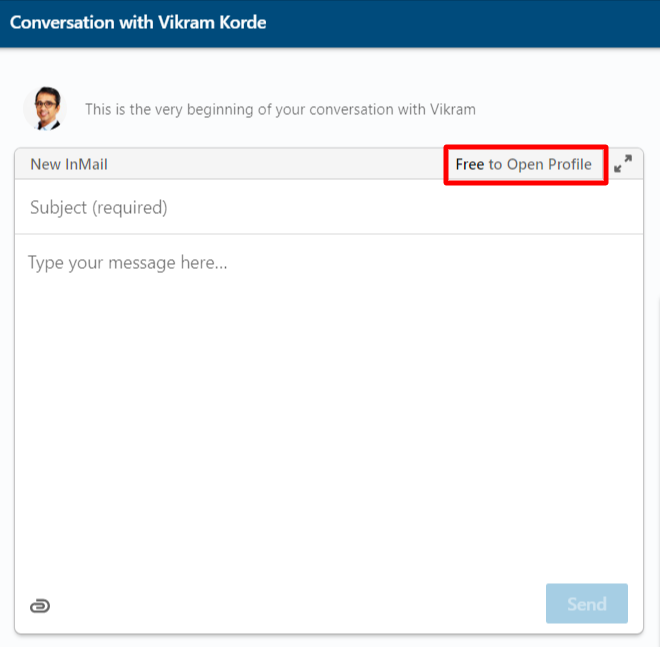
While there isn’t a specific badge distinguishing open profiles, este privilege es exclusive para premium LinkedIn users.
Otro method involves utilizing tools like Scrupp. Al scraping data y organizing it en un Excel sheet, puedes identify open profiles a través de una dedicated column indicating their status.
Al identifying open profiles y utilizing tools like Scrupp, puedes effortlessly bypass the InMail credit limit, allowing you to scale your messaging efforts en LinkedIn Sales Navigator.
According to LinkedIn, InMail messages tienen un significantly higher response rate compared a regular email. Al bypassing the InMail credit limit, puedes reach more potential leads y increase your chances de generating new business. Just remember to always personalize your messages y provide value a tus recipients.
2) Using LinkedIn Boolean Search en Sales Navigator
Profundicemos en LinkedIn Boolean Search en Sales Navigator, understanding el concept de Boolean search y los various operators que pueden significantly enhance your search capabilities.
I) ¿Qué es Boolean Search?
Boolean search es una technique used en search engines, databases, y social media platforms like LinkedIn. It allows users a combine keywords con operators like AND, OR, NOT para produce more relevant y specific results.
En el context de LinkedIn Sales Navigator, esto means refining your search para find highly targeted leads y connections.
II) Boolean Operators:
a) AND: Use 'AND' para narrow down your search. It ensures que both keywords están present en los results.
For example, "Sales Manager AND Technology" will find profiles containing both terms.
b) OR: 'OR' broadens your search. It retrieves profiles containing either of the specified terms.
For instance, "Sales Executive OR Account Manager" will find profiles con either job title.
c) NOT: 'NOT' excludes specific terms from your search.
For example, "Marketing NOT Manager" will find profiles con 'Marketing' but without 'Manager.'
d) Quotation Marks (" "): Use quotation marks para search for an exact phrase.
For example, "Digital Marketing Specialist" will find profiles con this precise job title.
e) Parentheses (()): Parentheses are used para group related terms.
For example, "(Sales OR Business Development) AND (Technology OR IT)" will find profiles related a both sets of terms.
f) Asterisk (*): El asterisk es un wildcard character. It replaces zero o more characters en una word.
For example, "engin*" will find profiles containing words like 'engineer,' 'engineering,' etc.
III) Example Scenario:
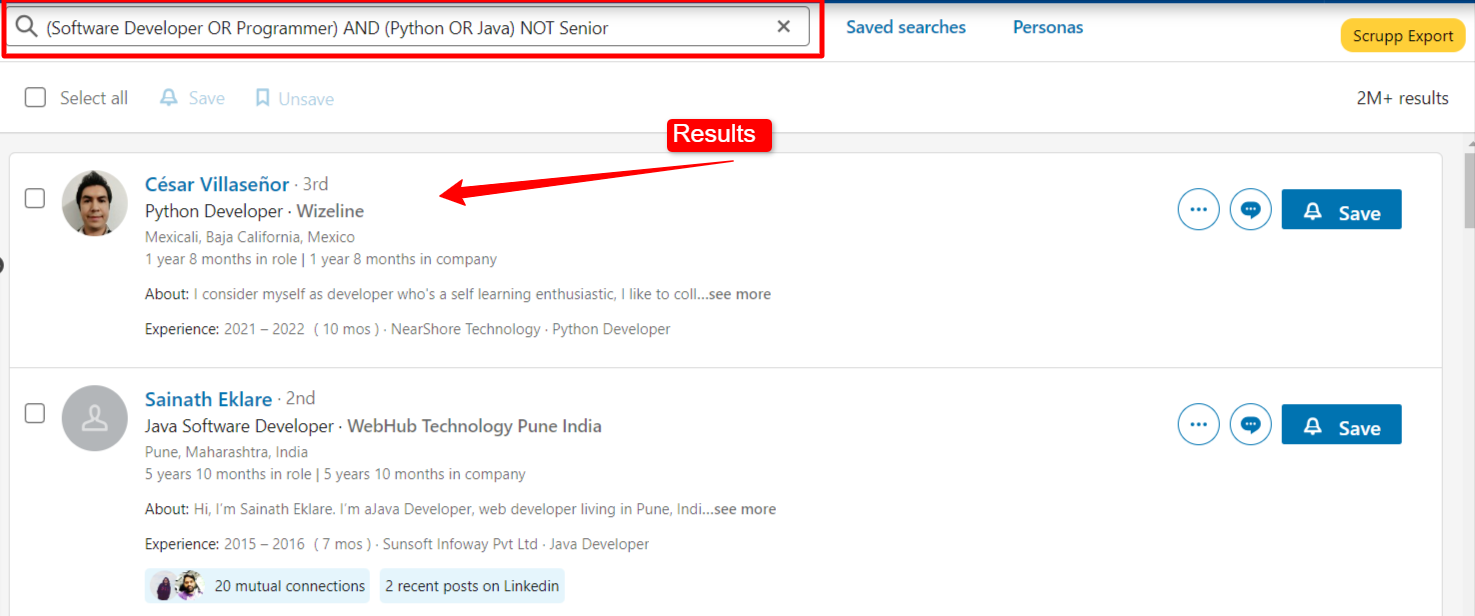
Imagine que estás recruiting software developers con expertise en Python o Java, but you want to exclude senior positions. Tu search query podría look like this:
(Software Developer OR Programmer) AND (Python OR Java) NOT Senior
Esta query ensures you find profiles containing terms related a software development y specific programming languages while excluding senior-level positions.
Mastering these Boolean operators empowers you a conduct highly precise searches en LinkedIn Sales Navigator, enabling you a discover the most relevant leads y connections para tu business.
¿Cómo usar LinkedIn Sales Navigator Mobile App?
LinkedIn Sales Navigator Mobile App offers the freedom para conduct your professional networking y outreach on-the-go, sin los confines de una laptop.
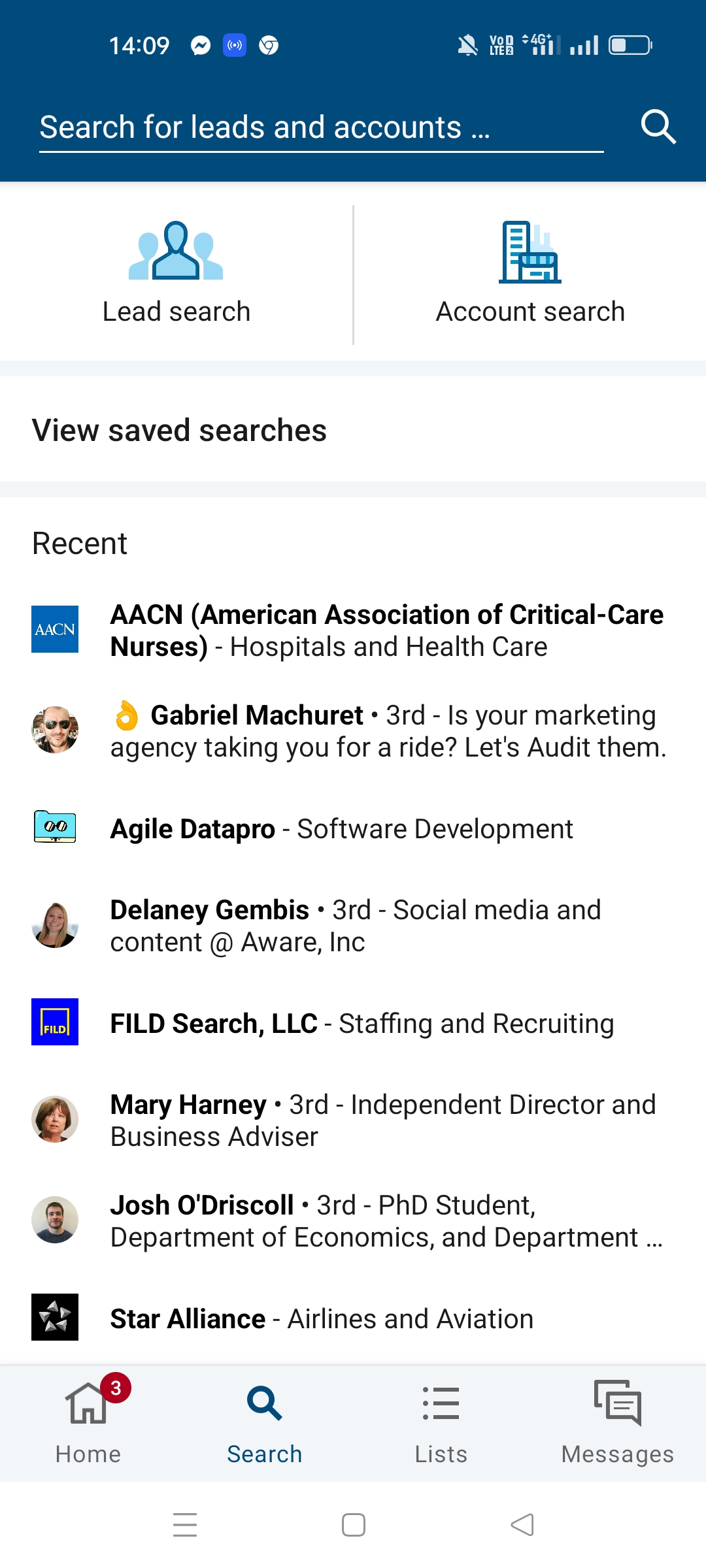
Key Features:
I) Lead and Company Filters: Apply specific filters para pinpoint your ideal prospects, ensuring efficient search y targeted connections.
ii) Messaging y Connection Requests: Reach out a new leads promptly a través de messages o connection requests, vital en fostering timely y meaningful relationships.
iii) Stay Updated: Receive real-time alerts concerning tus saved leads y accounts, ensuring you're always in the loop.
Why It Matters:
I) Efficient InMails: La mobile app streamlines sending InMails, enhancing your responsiveness a potential clients.
II) Quick Response: Speed is crucial en sales. La app empowers you a promptly respond a leads, solidifying your professional relationships.
LinkedIn Sales Navigator Mobile App es tu essential tool para swift, effective, y responsive outreach. Download the app now y elevate your sales game.
- - For Andriod Users: Download Now
- - For iOS Users: Download Now
¿Cómo Export Profiles Data & Find Emails de LinkedIn Sales Navigator?
LinkedIn Sales Navigator es una powerful tool, yet it lacks crucial features like exporting data y finding contact details. Aquí es donde Scrupp, una third-party tool, comes to the rescue.
Scrupp es un game-changer para linkedin for sales. It allows you a extract valuable data de LinkedIn Sales Navigator profiles, including verified email addresses, lo cual can significantly enhance your outreach efforts. Con Scrupp, puedes build targeted lists de prospects y personalize your messaging para maximum impact.
Es una dedicated LinkedIn Sales Navigator Scraper & Email finding tool.
Scrupp seamlessly integrates con LinkedIn Sales Navigator via una Chrome extension. Aquí te mostramos cómo make it work for you:
I) Create an Account:
Visit Scrupp.com y sign up for an account.
II) Download Chrome Extension:
Install la Scrupp extension en tu Chrome browser.
III) Choose Your Export Option:
Decide whether you want to export contacts de Sales Navigator o LinkedIn.
IV) Apply Filters:
Use filters such as job title, location, o industry para refine your target audience.
V) Initiate Export:
Click en Scrupp Export after selecting your desired audience.
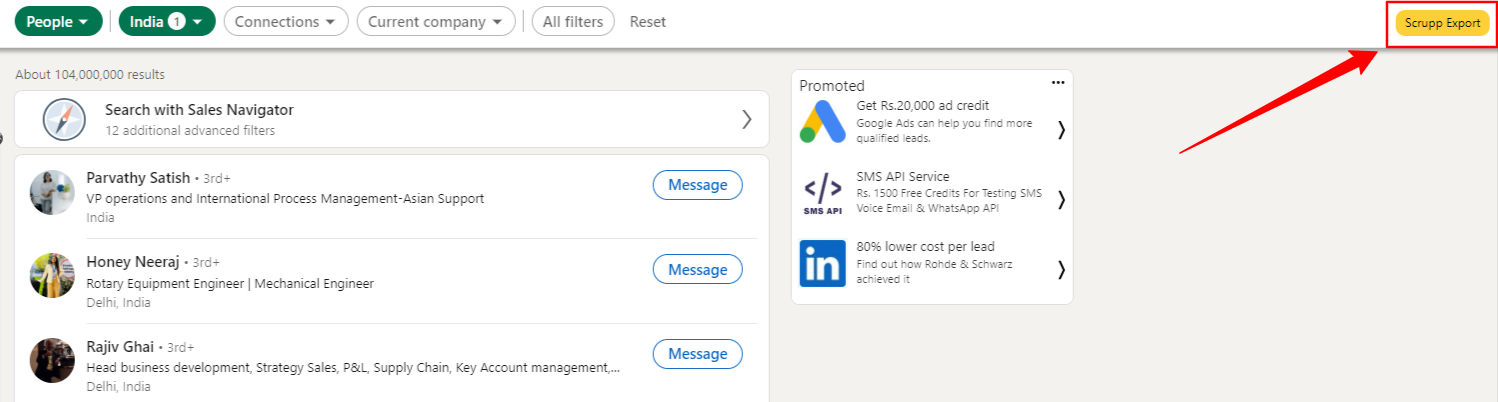
VI) Customize Your Export:
Name your output file, specify the number de leads a scrape, y choose between extracting emails o profile data.
Note: Scrupp offers 1000 free credits para scraping y 50 credits para finding profile emails. Additional credits are available a través de paid plans.
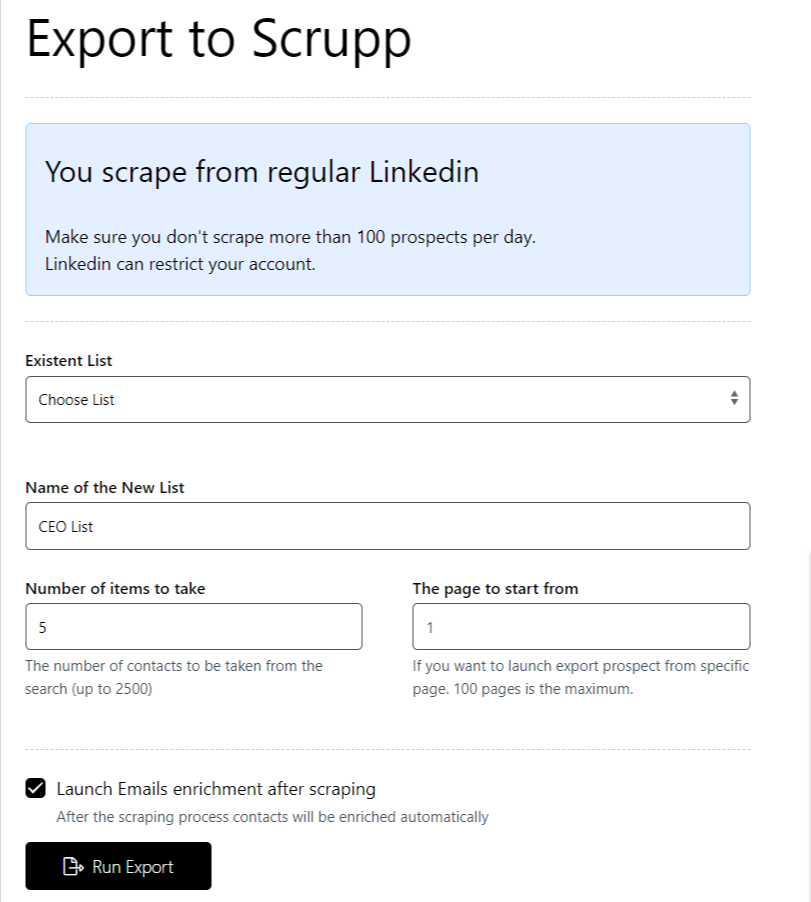
VII) Run Your Export:
Click 'Run Export' y let Scrupp do its magic.
¡Voila! Has successfully exported 5 profiles y 1 verified email address. Scrupp ensures you receive accurate y valid email data hassle-free.

Note: Sample image displayed. Actual file contains 20+ columns.
¿Cuáles son los diferentes Sales Navigator Plans?
LinkedIn Sales Navigator offers three distinct plans catering a various needs: Core, Advanced, y Advanced Plus.
Aquí tienes una quick comparison table para help you decide which plan is right for you:
| Feature | Core | Advanced |
|---|---|---|
| Advanced Search Filters | Yes | Yes |
| Lead Recommendations | Yes | Yes |
| TeamLink | No | Yes |
| Smart Links | No | Yes |
| CRM Integration | Basic | Advanced |
I) Core Plan:
Ideal para individual users, el Core plan provides essential Sales Navigator features a monthly cost ranging from $40 to $60. It's perfect para personal users no requiring extensive team collaboration.
II) Advanced Plan:
Para businesses seeking more advanced features, el Advanced plan, priced between $100 to $120 per month, offers additional tools para effective networking y sales outreach.
III) Advanced Plus Plan:
El Advanced Plus plan, tailored para meet specific business requirements, offers personalized solutions. Para explore this plan, reach out a LinkedIn Sales Navigator directly.
Key Features (Available para Advance y Advance+ Plan)
I) TeamLink: It allows you a leverage your team's connections, extending your network reach para find warmer prospects y boost collaborative selling efforts.
II) Smart Links: Smart Links help tailor communication by showing how leads interact con shared content. For instance, si I send a PDF link via InMail, it becomes a Smart Link.
I can then track si el recipient opened el PDF y how long they engaged with it, refining my communication strategy.
III) Usage Reporting y Account Center: Access detailed analytics on user activity, empowering businesses a optimize their Sales Navigator usage para improved sales strategies.
IV) Dedicated Relationship Manager: Receive personalized support y guidance from a dedicated Relationship Manager, maximizing your use of the platform.
V) SSO y Employee Data Integration: Ensure secure access con Single Sign-On (SSO) y seamlessly synchronize employee data, enhancing user management y overall security.
VII) Advanced CRM Integration: LinkedIn Sales Navigator offers deep integration con CRM systems, enabling smooth data flow, real-time updates, y enhanced collaboration between sales teams, boosting overall efficiency y productivity.
¿Cómo usar LinkedIn Sales Navigator For FREE?
LinkedIn Sales Navigator, una powerful tool para professionals, comes con una free trial limited a one month each year. But what if you need it para los remaining 11 months sin stretching your budget thin?
Disclaimer: Using unofficial methods para access LinkedIn Sales Navigator for free may violate LinkedIn's terms of service. Always exercise caution y prioritize ethical practices.
Aquí tienes una comprehensive guide para explore your options:
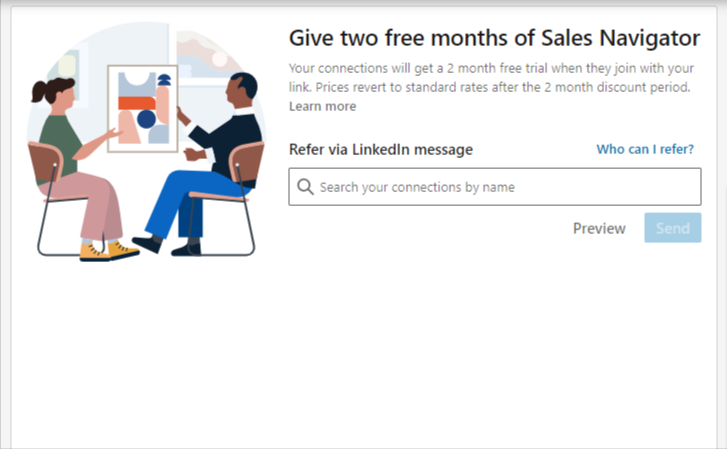
I) Leverage Referral Offers:
Existing Sales Navigator users often possess referral options granting an extra 2-month free trial. Hunt down these individuals y kindly request their referral, extending your access sin any cost.
II) Connect con LinkedIn Employees:
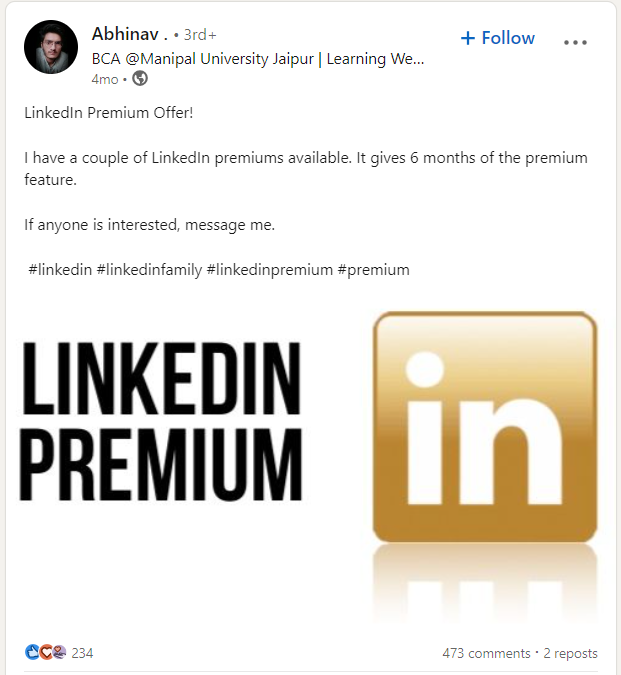
Certain LinkedIn employees possess 6-month free trial codes. Search for hashtags like #LinkedInPremium o #PlusOnePledge on LinkedIn para identify the right contacts.
Politely approach them, y you might secure an extended trial period.
III) Explore 'Visual Studio Dev Essentials':
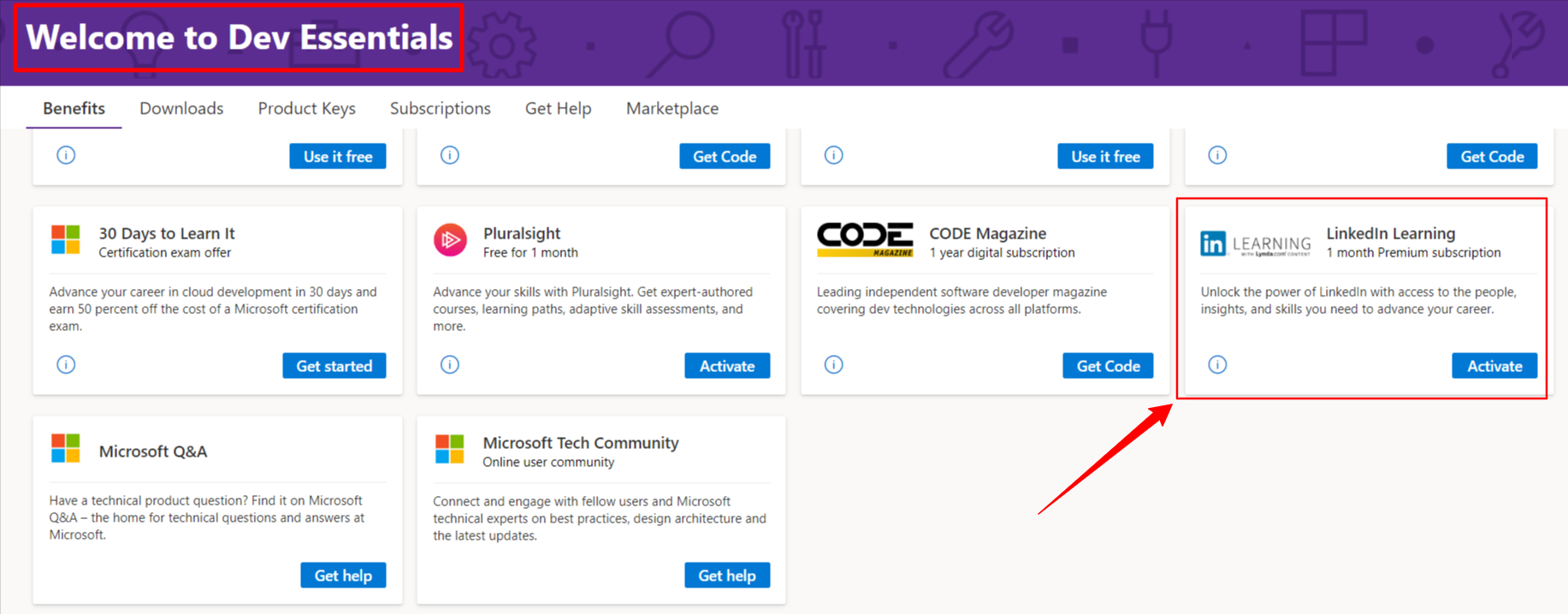
Al creating an account on "Visual Studio Dev Essentials" (accessible via this link: Visual Studio Dev Essentials), puedes avail a complimentary 1-month premium account.
This avenue provides a short-term solution para tus Sales Navigator needs.
IV) Exclusive Offers para Journalists y Students:
Journalists y students often have tailored offers para LinkedIn Sales Navigator. Una quick online search can reveal these special arrangements, potentially granting you extended access.
V) Third-Party Markets (Beware of Scams):
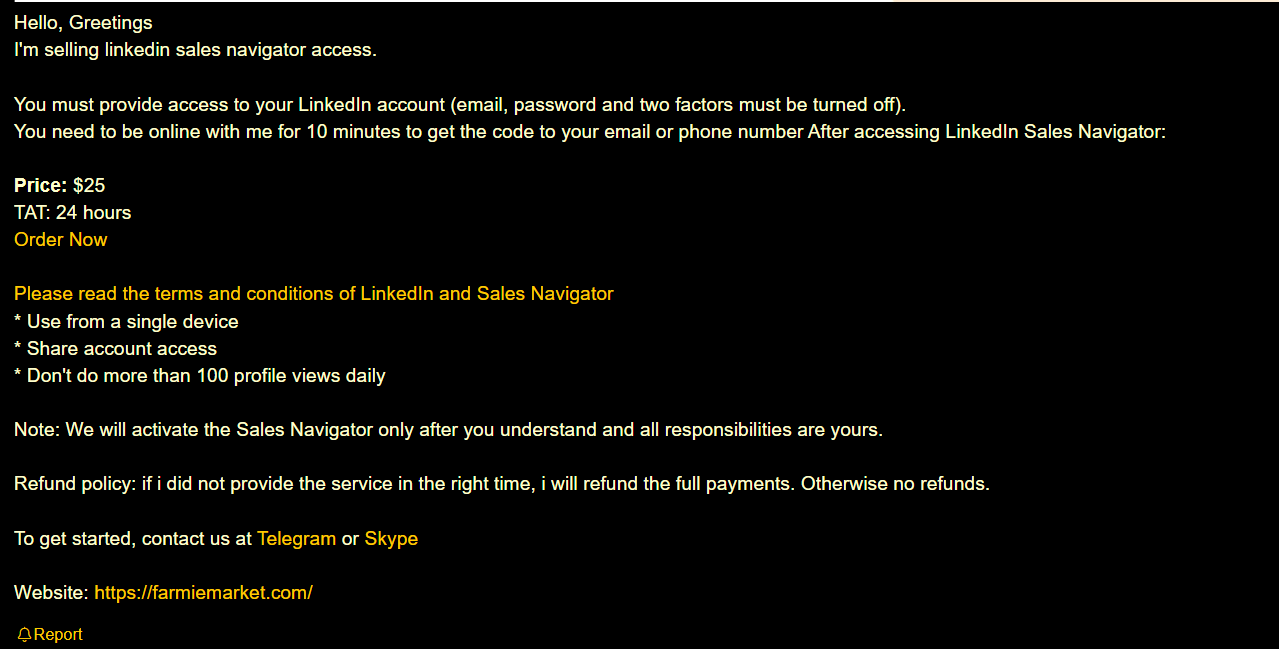
En algunos third-party markets like Facebook groups o Blackhatworld, individuals sell Sales Navigator subscriptions a lower price. Exercise caution, perform due diligence, y be vigilant about potential scams si you decide a explore this option.
¿Cuáles son los LinkedIn Sales Navigator Benefits?
Los sales navigator benefits extend far beyond simple lead generation. Al using Sales Navigator, professionals gain access a advanced search filters que allow them a pinpoint their ideal customers con incredible accuracy. Esta precision targeting saves time y resources, ensuring que outreach efforts están focused en los most promising prospects. Furthermore, Sales Navigator benefits users by providing real-time insights y updates on their saved leads y accounts, enabling timely y relevant engagement. Ultimately, these advantages translate into increased sales, stronger client relationships, y a more efficient sales process.
LinkedIn Sales Navigator es tu key para unlocking unparalleled insights y connections, far beyond what a basic LinkedIn account offers. Con sus advanced filters, finding the ideal prospects y company details becomes effortless.Pero la real magic lies en los results: increased revenue, meaningful relationships que fuel your business, y potential career opportunities. It all boils down a one thing: financial growth.
En LinkedIn, every post, every interaction es una chance para enhance your social selling game y attract valuable clients. Approach LinkedIn Sales Navigator strategically; it's your ticket to success.
Remember, successful selling is about finesse, not desperation.
Para strategic navigators en el B2B world, LinkedIn Sales Navigator es more than just a tool; it's a compass guiding you through the complex landscape de potential clients y connections. Al leveraging its advanced search filters y personalized insights, puedes pinpoint the most promising leads y tailor your outreach efforts para maximum impact. Think of it as having a strategic navigator en tu corner, constantly scanning the horizon para opportunities y helping you chart the best course para achieve your sales goals. It's about making informed decisions, building genuine relationships, y ultimately, driving sustainable growth para tu business. Mastering Sales Navigator transforms your approach de reactive a proactive, ensuring you're always one step ahead en la competitive sales arena.
Strategic Navigators: Estos son professionals who understand the value de targeted outreach y relationship-building. They use LinkedIn Sales Navigator para identify key decision-makers, track company updates, y personalize their messaging para maximum impact. They are the ones who transform data into actionable insights y drive sustainable growth para their businesses.
In Conclusion: Your Journey Begins Here!
¡Congratulations! Has just unlocked the door a un world de endless opportunities con LinkedIn Sales Navigator. Armed with advanced filters, insightful data, y strategic networking, you're now prepared para take your business a unprecedented heights.
One of the key advantages de LinkedIn Sales Navigator lies en su array de navigator's tools designed para streamline el sales process. Estas tools include advanced search filters, lead recommendations, y real-time insights into tus target accounts y prospects. Con navigator's tools like the Relationship Explorer y Account Alerts, sales professionals can identify key decision-makers, track company updates, y personalize their outreach efforts. Furthermore, la integration con CRM systems enhances efficiency by ensuring seamless data flow y collaboration across teams. Al leveraging these navigator's tools effectively, sales teams can optimize their prospecting, engagement, y ultimately, their sales performance.
But remember, success is not just about numbers—it's about the meaningful connections you build, the relationships you nurture, y the genuine value you bring a every interaction. As you embark on this journey, keep your passion alive, stay authentic, y let every conversation count.
So, go ahead, make your mark, y turn your aspirations into achievements. Con LinkedIn Sales Navigator as your guide, the sky's not the limit; it's just the view from the starting point de tu extraordinary journey.
Frequently Asked Questions (FAQ's)
1) ¿Cuál es la difference between LinkedIn Sales Navigator y regular LinkedIn?
LinkedIn Sales Navigator está specifically designed para sales professionals, offering advanced search filters, lead recommendations, y collaborative features tailored para targeted prospecting.
Regular LinkedIn, on the other hand, serves como un general professional networking platform, providing basic connectivity y interaction tools. Sales Navigator enhances the sales prospecting experience, ensuring a more efficient y focused approach para businesses y sales teams.
2) ¿Hay any limitations o drawbacks a using LinkedIn Sales Navigator como sales tool?
Yes, LinkedIn Sales Navigator has limitations en finding emails y exporting profile data. However, these limitations can be overcome by using third-party tools like Scrupp.com, which offer solutions para efficiently finding emails y exporting data de LinkedIn Sales Navigator profiles, enhancing the tool's capabilities para sales professionals.
3) ¿Cómo puede LinkedIn Sales Navigator help with lead generation y prospecting?
LinkedIn Sales Navigator es una powerful tool para lead generation y prospecting. Con sus advanced search features, puedes easily find potential leads y prospects. La tool also provides insights into accounts, allowing for personalized outreach y engagement.
It offers lead recommendations y saving options para easy organization. Plus, con integrations a CRM systems, Sales Navigator streamlines the entire sales process from lead generation a closing deals.
4) ¿Puedes integrate LinkedIn Sales Navigator con other sales tools o CRMs?
Yes, LinkedIn Sales Navigator can be seamlessly integrated con other sales tools o CRMs like Salesforce, HubSpot, y Microsoft Dynamics. Esta integration allows for smooth data transfer between platforms, although it may require technical expertise o assistance from a developer.
5) ¿Cómo filter open profiles en Linkedin?
LinkedIn Sales Navigator itself doesn't offer a direct method a filter open profiles. However, employing third-party tools like Scrupp.com allows you a extract profile data into an Excel sheet, indicating which profiles are open. This information can be utilized a filter open profiles y initiate connections con them.
6) ¿Qué Does 1st 2nd y 3rd Mean en LinkedIn?
En LinkedIn, "1st," "2nd," y "3rd" connections indicate your degree de connection con other users.
- - 1st: You are directly connected con this person.
- - 2nd: You share a mutual connection con this person.
- - 3rd: You are connected a this person through a second-degree connection.
7) ¿How Many LinkedIn Connections Can You Send Per Day?
Puedes typically send a maximum de 100 connection requests per week, which averages out a about 20 a 25 requests per day. Please note that these numbers can vary, but this is the general guideline.
LinkedIn sponsored content pricing varies depending on several factors, including your target audience, ad format, y bidding strategy. Unlike organic posts, LinkedIn sponsored content allows you a reach a wider, more targeted audience. El pricing model typically operates on a cost-per-click (CPC) o cost-per-impression (CPM) basis. Para optimize your budget, carefully define your target audience, experiment con different ad formats (e.g., single image ads, carousel ads, video ads), y continuously monitor your campaign performance. A/B testing different ad creatives y headlines can also help improve your click-through rates y lower your overall costs. Remember a align your sponsored content con your business goals y ensure it provides value a your target audience.
While account search by email is not a direct feature within LinkedIn Sales Navigator, there are alternative methods a achieve similar results. One approach is a use third-party tools like Scrupp, which can enrich your existing data by finding associated LinkedIn profiles based on email addresses. This allows you a effectively perform an account search by email indirectly, linking email contacts a their corresponding LinkedIn accounts. Although Sales Navigator doesn't natively support this functionality, integrating external tools can bridge this gap, providing a more comprehensive solution para identifying y connecting con key decision-makers within target companies. This workaround enhances your prospecting efforts y streamlines your outreach strategy.
So, what does LinkedIn Sales Navigator do, exactly? En essence, it transforms LinkedIn from a passive networking site into an active lead generation y relationship-building powerhouse. It provides advanced search capabilities, allowing you a pinpoint ideal prospects based on specific criteria like job title, industry, company size, y even shared connections. Beyond that, it delivers real-time insights y updates on your saved leads y accounts, ensuring you're always informed about key developments y opportunities. Ultimately, what does LinkedIn Sales Navigator do is empower you a connect con the right people, at the right time, con the right message, driving more effective sales y business development outcomes. It's about working smarter, not harder, para achieve your professional goals.
Understanding how to use Sales Navigator on LinkedIn effectively is crucial para maximizing its potential. Start by defining your ideal customer profile, outlining the key characteristics de your target audience. Then, leverage Sales Navigator's advanced search filters para identify leads y accounts que match your criteria. Save these prospects a targeted lists y monitor their activity para opportunities a engage. Personalize your outreach efforts based on the insights you gather, y track your results a refine your strategy over time. Mastering how to use Sales Navigator on LinkedIn involves a combination de strategic planning, diligent execution, y continuous optimization. It's about transforming data into actionable insights y building meaningful relationships que drive business growth.
Consider a Sales Navigator coach as your guide a mastering this powerful tool. They can provide personalized training, tailored strategies, y ongoing support para help you maximize your results. A skilled Sales Navigator coach can teach you advanced search techniques, help you develop effective outreach strategies, y show you how to leverage the platform's insights a close more deals. They can also help you stay up-to-date con the latest features y best practices, ensuring you're always one step ahead de la competition. Investing en coaching can significantly accelerate your learning curve y unlock the full potential de Sales Navigator para your business.
Para those deeply involved en sales nv, LinkedIn Sales Navigator offers a competitive edge by providing targeted lead generation y enhanced networking capabilities. Al utilizing its advanced search filters, professionals en sales nv can identify y connect con key decision-makers within their target industries. This facilitates more personalized y effective outreach, leading a increased engagement y higher conversion rates. Furthermore, the real-time insights y updates provided by Sales Navigator enable users a stay informed about industry trends y company developments, allowing them a tailor their sales strategies accordingly y maintain a competitive advantage en el market.
Before committing a LinkedIn Sales Navigator, it's wise a consider navigator reviews from current users. These reviews often highlight the tool's strengths, such as its advanced search capabilities y lead recommendations. However, navigator reviews may also point out areas for improvement, like the cost o the learning curve associated con mastering all its features. Reading a variety de navigator reviews can provide a balanced perspective, helping you determine if the tool aligns con your specific business needs y goals. Look for reviews that discuss the impact on sales performance, ease de integration con existing workflows, y the quality de leads generated.
Para fully leverage the power de LinkedIn Sales Navigator, consider investing en LinkedIn Sales Navigator training. Many online resources, courses, y workshops are available para help you master the tool's features y functionalities. Effective LinkedIn Sales Navigator training should cover topics such as advanced search techniques, lead management strategies, y best practices para engaging con prospects. Some training programs also offer guidance on integrating Sales Navigator con other sales tools y CRM systems. Al investing en LinkedIn Sales Navigator training, puedes equip your sales team con the knowledge y skills needed a maximize their prospecting efforts y drive revenue growth.
Before committing a a subscription, a thorough LinkedIn Sales Navigator review is essential. A comprehensive LinkedIn Sales Navigator review will delve into the platform's strengths, such as its powerful search filters y lead recommendations, as well as potential drawbacks, like the cost y the learning curve. Look for reviews that offer insights into the tool's impact on lead generation, sales productivity, y overall ROI. A good LinkedIn Sales Navigator review should also compare the different subscription plans y highlight the features that are most relevant a your specific sales needs. Consider reading reviews from various sources para gain a balanced perspective y make an informed decision.
Before committing a a paid subscription, consider the option a test navigator features through a free trial. LinkedIn often offers a trial period that allows you a explore the platform's capabilities y determine if it aligns con your specific business needs. Use this trial period a test navigator search filters, lead recommendations, y engagement tools. Evaluate the quality de leads generated y assess how well the platform integrates con your existing sales workflows. Al taking advantage de la free trial, puedes make an informed decision about whether a invest en a full subscription. This allows you a test navigator functionality before making a financial commitment.
When deciding which LinkedIn Sales Navigator plan is right for you, understanding the difference between Sales Navigator Core vs Advanced is crucial. El Core plan offers fundamental features like advanced search y lead recommendations, ideal para individual sales professionals. However, para teams seeking enhanced collaboration y deeper insights, el Advanced plan provides tools like TeamLink, which leverages your team's network para find warmer leads. Furthermore, el Advanced plan includes Smart Links para tracking content engagement, y advanced CRM integration, making it a more robust solution para businesses aiming a maximize their sales efforts. Ultimately, the choice depends on your specific needs y whether you require team-oriented features y detailed analytics.
So how does Navigator work a actually improve your sales process? It all comes down a targeted searching y real-time insights. Al using the advanced filters, puedes pinpoint your ideal customer profiles con incredible accuracy. This means less time wasted on unqualified leads y more time spent engaging con prospects who are genuinely interested en your product o service. Moreover, Sales Navigator keeps you updated on key activities y changes within your target companies, allowing you a tailor your outreach y messaging para maximum impact. This proactive approach ensures that your sales efforts are not only efficient but also highly relevant, increasing your chances de closing deals y building lasting relationships. Understanding how Navigator work is understanding how a leverage data para sales success.
Para truly maximize your ROI, understanding LinkedIn Sales Navigator best practices is essential. Start by defining your ideal customer profile con precision, leveraging the advanced filters a target the right industries, job titles, y company sizes. Regularly update your saved leads y accounts a stay informed about their latest activities y changes. Personalize your outreach by referencing shared connections, recent posts, o company updates. Engage con your network by sharing valuable content y participating en relevant discussions. Finally, integrate Sales Navigator con your CRM a streamline your workflow y track your progress. Following these LinkedIn Sales Navigator best practices will not only improve your lead generation efforts but also enhance your overall sales performance.
Expert Tip: Para maximize your ROI con LinkedIn Sales Navigator, focus on quality over quantity. Spend time crafting personalized messages that resonate con your target audience. Research their company, industry, y recent activities a demonstrate genuine interest y build rapport. This approach will significantly increase your response rates y lead a more meaningful connections.