Si estás explorando el costo de Sales Navigator de LinkedIn, has llegado al lugar correcto. Comprender los diferentes niveles de Sales Navigator pricing es crucial para decidir si es la inversión adecuada para tu Sales Strategy. Este artículo desglosará los precios de cada uno de los principales sales navigator plans. Te ayudaremos a determinar si las features justifican el gasto para tu negocio en 2026.
Cubriremos los precios y las features de:
- LinkedIn Sales Navigator Core (Professional)
- LinkedIn Sales Navigator Advanced (Team)
- LinkedIn Sales Navigator Advanced Plus (Enterprise)
LinkedIn Sales Navigator ofrece tres opciones de precios principales. Cada una está diseñada para diferentes necesidades y tamaños de equipo. Es importante tener en cuenta que, si bien estas son tarifas estándar, los precios pueden variar ligeramente según la región o promociones específicas. Consulta siempre la página oficial de LinkedIn Sales Navigator para obtener la información más actualizada. Además, busca una posible free trial para probar antes de comprometerte con cualquier linkedin sales navigator plan.
Aquí tienes un resumen rápido de las tarifas facturadas mensualmente:
- Sales Navigator Core (Professional) cuesta $99 al mes
- Sales Navigator Advanced (Team) cuesta $149 al mes
- Sales Navigator Advanced Plus (Enterprise) comienza en $1600 al año
A menudo puedes reducir estos precios significativamente optando por la facturación anual. Pagar tu subscription a Sales Navigator anualmente suele ofrecer un descuento. Esto lo convierte en una opción más rentable para los usuarios a largo plazo. Esto puede generar ahorros de alrededor del 25% en comparación con los pagos mensuales.
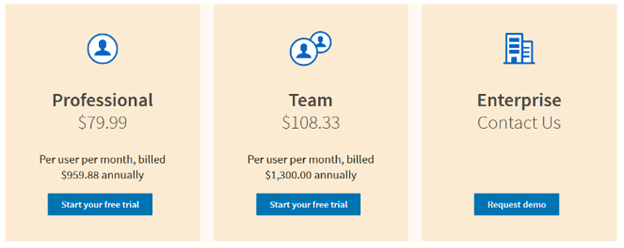
Aquí están los precios mensuales efectivos cuando se factura anualmente:
- Sales Navigator Core (Professional) costará $79.99 al mes
- Sales Navigator Advanced (Team) costará $108.3 al mes
- Sales Navigator Advanced Plus (Enterprise) comienza en $1600 al año (facturado anualmente por puesto)
LinkedIn Sales Navigator Plans: Una Comparación Detallada
Para ayudarte a comparar los diferentes sales navigator plans, aquí tienes una tabla completa que describe sus features y usuarios ideales:
| Plan | Precio Mensual (Facturado Mensualmente) | Precio Mensual Efectivo (Facturado Anualmente) | Precio Anual (Enterprise) | Características Clave e Ideal Para |
|---|---|---|---|---|
| Sales Navigator Core (Professional) | $99 | $79.99 | N/A |
|
| Sales Navigator Advanced (Team) | $149 | $108.3 | N/A |
|
| Sales Navigator Advanced Plus (Enterprise) | N/A | N/A | Comienza en $1600 por puesto |
|
Sales Navigator Core Pricing (Professional)
El paquete Core (Professional) es el linkedin sales navigator plan más accesible y asequible. Es un excelente punto de partida para profesionales de sales individuales, freelancers o small businesses. Es perfecto para aquellos que recién comienzan su viaje con social selling y lead generation en LinkedIn.
Por este precio, obtienes acceso a las esenciales sales navigator features que pueden mejorar significativamente tus esfuerzos de prospecting:
- Extensive Lead and Account Search Filters: Esta es una feature fundamental. Puedes usar criterios muy específicos para identificar a tus prospects ideales. Estos criterios incluyen industry, job title, company size, seniority level e incluso Keywords. Estos advanced search filters te permiten eliminar el ruido y encontrar exactamente a quien necesitas. Esta precisión ahorra tiempo y mejora la calidad de tu outreach.
- Lead and Account Activity Alerts: Mantente actualizado sobre tus saved leads y accounts. Recibe notifications cuando cambien de job, publiquen nuevo Content o sean mencionados en las news. Esto te ayuda a identificar momentos oportunos para el outreach, haciendo tus messages más oportunos y relevantes. Es como tener un asistente personal rastreando a tus prospects.
- Capacidad para Diseñar Listas Únicas de Lead y Account: Organiza tus prospects en custom lists. Esto hace que la gestión de tus outreach pipelines sea mucho más eficiente. Puedes categorizar leads por project, region, industry o cualquier otro criterio relevante. Esta organization es key para campañas de Targeting.
- Saved Lookups (Saved Searches): Guarda tus search queries más efectivas. Esto significa que no tienes que volver a introducir filters cada vez que comienzas a hacer prospecting. Streamline tu Workflow y asegura la consistency en tu Targeting. También puedes track nuevos leads que se ajusten a tus `saved leads` criteria automáticamente. Esto asegura que nunca pierdas una potencial opportunity.
- Limited InMail Credits: Aunque no se menciona explícitamente en la table, los planes Core típicamente incluyen un set number de inmail credits cada month, usualmente alrededor de 20-30. Estos te permiten send direct messages a miembros de LinkedIn con los que no estás connected. Esta es una crucial tool para el initial outreach cuando no tienes una existing connection.
- Lead Recommendations: Sales Navigator también proporciona intelligent lead recommendations basadas en tu search history y saved preferences. Esta feature ayuda a discover nuevos prospects que podrías haber missed, expanding your potencial outreach.
El plan Core es perfecto si quieres aprovechar el power de LinkedIn para encontrar nuevos leads y construir relationships. Es ideal si no necesitas advanced team collaboration o deep CRM Integration. Se trata de empowering al individual salesperson para que sea más effective y efficient en su prospecting.
Sales Navigator Advanced Pricing (Team)
El plan Sales Navigator Advanced (Team) está diseñado para equipos de sales pequeños y medianos. Se basa en las features de Core añadiendo potentes collaboration tools. El price listado típicamente incluye access para hasta 10 users, pero additional users se cobrarán aproximadamente un 20% por user. Esta structure lo hace scalable a medida que tu team crece y tus needs evolucionan.
Este plan es un significant step up, ofreciendo capabilities que fomentan team synergy y mejoran collective prospecting efforts. Es más costly que el Core (Professional) Plan because de estas added features, que son vital para un coordinated sales approach.
Extra Features on Sales Navigator Advanced for This Price
Por este pricing, recibes three critical additional capabilities en Sales Navigator Advanced:
- Smartlinks: Esta feature te permite publish Content y track prospect engagement con ese material. Puedes create custom presentations o documents, share them, y luego see who viewed them, for how long, y which pages they interacted with. Esto proporciona invaluable Insights into prospect interest y intent. Ayuda a understand what Content resonates, allowing for more tailored follow-ups.
- Teamlinks: Esta powerful feature permite a los team members leverage each other's networks. Puedes see if a colleague has a 1st-degree connection to a prospect you're Targeting. Esto makes warm introductions mucho easier y reduces cold outreach, significantly improving response rates. Effectively expands your team's reach by allowing you to source LinkedIn connections more effectively y strategically.
- CSV Upload: Esta capability permite upload a list of accounts o leads via a CSV file. Sales Navigator then matches these to LinkedIn profiles, helping you to generate Targeted account lists y enrich your existing data. Es ideal para integrating external data into your Sales Navigator Workflow, such as leads from a conference o a different marketing campaign.
- More InMail Credits: El plan Advanced típicamente incluye a higher allocation de inmail credits compared al Core plan, often around 50 per user per month. Esto reflects the needs de a more active sales team for broader y more consistent outreach to potencial clients.
El plan Advanced es una strategic choice para teams looking to centralize their prospecting efforts, share Insights, y leverage their collective network for better lead generation y relationship building. It transforms individual efforts into a cohesive team strategy.
Sales Navigator Advanced Plus Pricing (Enterprise)
El advanced plus plan, conocido como Sales Navigator Enterprise, está tailored para large organizations con complex sales structures y extensive CRM needs. Unlike the other plans, it does not have a set, publicly advertised price. Instead, you'll típicamente find a web page requesting that you schedule a demo with LinkedIn's sales team. However, we do know that the cost starts at about $1,600 per seat each year, with pricing customized based on your specific requirements.
El cost se determina por factors such as the number of users, the level of CRM Integration required, y any specific support needs. You will be assigned a personal Account Manager to assist you with this. Esto ensures the plan is perfectly aligned with your enterprise sales strategy y provides dedicated support for your large team.
Sales Navigator Advanced Plus Tiene Additional Capabilities for This Price
Por este Premium pricing, you receive advanced capabilities designed to integrate Sales Navigator deeply into your enterprise sales ecosystem:
- Teamlink Extend: Esto takes the Teamlinks feature to the next level. It provides broader access to all of your colleagues' 2nd and 3rd-degree relationships, not just direct connections. Esto vastly expands your team's potential network for warm introductions y Targeted outreach. It's incredibly powerful for large organizations with thousands of employees.
- Real-Time Contact Update: Esta crucial feature ensures your CRM data stays fresh. You receive notifications when a lead in your CRM changes jobs o companies. Esto helps you maintain accurate records y identify new opportunities o risks, such as a contact moving to a target account. It prevents outdated information from derailing your sales efforts.
- Advanced CRM Integration: This is a key differentiator for the Enterprise plan. It allows for deep, comprehensive Integration of all LinkedIn data into your CRM system. Esto means seamless data flow, automated lead creation, y a unified view of your customer interactions directly within your existing sales tools. It's essential for large teams relying heavily on CRM for pipeline management y reporting.
- Highest InMail Credits: El Enterprise plan típicamente offers the highest number de inmail credits, often customized based on the enterprise's specific requirements y user count. Esto caters to the extensive outreach needs de large sales organizations y supports high-volume prospecting campaigns.
- Dedicated Support and Training: Enterprise clients often receive dedicated account management y tailored training programs. Esto ensures your large team can fully leverage all the advanced features e integrate them smoothly into existing workflows.
El Advanced Plus plan es una significant investment for companies that need to Scale their LinkedIn prospecting. It's for those who require data accuracy across platforms y want to empower large sales teams with the most comprehensive tools available. It's about maximizing efficiency y strategic advantage at an enterprise level.
Comprendiendo los InMail Credits en los Sales Navigator Plans
Los InMail credits son una vital feature de LinkedIn Sales Navigator. Te permiten send direct messages a miembros de LinkedIn con los que no estás connected. Esta es una powerful way to initiate conversations con prospects who might not be in your immediate network. El number de InMail credits que recibes varies significantly across the different sales navigator plans:
- Core (Professional): Típicamente includes a limited number de InMail credits per month, often ranging from 20 to 30. Esto is sufficient for individual users focusing on Targeted, quality outreach rather than high volume.
- Advanced (Team): Offers a higher allocation de InMail credits, usually around 50 per user per month. Esto reflects the increased outreach needs de a sales team y allows for more frequent engagement con prospects.
- Advanced Plus (Enterprise): Provides the highest number de inmail credits. El exact number is often customized based on the enterprise's specific requirements, user count, y overall Sales Strategy. Esto supports extensive outbound campaigns across large sales organizations.
Es crucial gestionar tus InMail credits de manera effective. Unused credits usually roll over for a limited period, often up to three months, but policies can vary. Es best to utilize them consistently to maximize your outreach potencial y connect con valuable prospects. Remember that a well-crafted InMail can be significantly more effective than a generic cold email, especially when combined with Insights gained from Sales Navigator's advanced search filters y activity alerts.
¿Vale la pena el costo de LinkedIn Sales Navigator en 2026?
La question de whether LinkedIn Sales Navigator is "worth the cost" depends entirely on your specific sales goals, team size, y budget. Es una powerful tool, but like any investment, its true value is realized through strategic y consistent use.
Cuando SÍ vale la pena:
- High-Value Leads: Si tu business targets high-value clients (B2B, enterprise deals, complex sales cycles), the ability to precisely identify y engage Decision-makers can yield significant ROI. El cost de a lost deal can far outweigh the subscription fee.
- Scaling Outreach: For individuals o teams looking to Scale their prospecting efforts beyond basic LinkedIn search, the sales navigator features like advanced search filters, lead recommendations, y the ability to organize saved leads are invaluable. They provide efficiency y focus.
- Team Collaboration: Los Advanced y Enterprise plans offer features like Teamlinks y smart links that dramatically improve team efficiency y collaboration. They make it easier to share Insights, leverage collective networks, y ensure a unified approach to prospecting.
- Data Integration: Si seamless Integration with your CRM is critical for maintaining data hygiene y Streamline workflows, especially for larger teams, the Advanced Plus plan offers unparalleled capabilities. Esto reduces manual Data Entry y ensures your sales team has the most up-to-date information.
- Reduced Cold Outreach: By enabling warm introductions through Teamlinks y providing deep Insights into prospects, Sales Navigator can significantly reduce the need for purely cold outreach. Esto often leads to higher response rates y more meaningful initial conversations, ultimately improving conversion rates.
- Targeted Market Penetration: If you're entering a new market o launching a new product, Sales Navigator's precise Targeting allows you to quickly identify y engage with your ideal Customer Profile.
Cuando PODRÍA no valer la pena:
- Very Small Budget: Si tu budget is extremely tight y you only need basic lead identification, the free version de LinkedIn o LinkedIn Premium might suffice for very limited needs. El ROI might not justify the monthly expense.
- Infrequent Use: Si you only prospect occasionally, o if LinkedIn is not a primary channel for your sales, the monthly o annual cost might outweigh the benefits. Consistent use is key to seeing value.
- Consumer-Focused Business: Sales Navigator is primarily a B2B tool. If your target audience is primarily consumers (B2C), other marketing channels y tools might be more effective y cost-efficient.
- Lack of Sales Process: Si your sales team lacks a clear process for prospecting, outreach, y follow-up, simply having Sales Navigator won't magically solve your problems. It's a tool that amplifies an existing effective strategy.
En última instancia, Sales Navigator es una investment en la efficiency y effectiveness de tu sales team. Consider starting con a free trial si está available, o el Core plan, to assess its impact on your lead generation efforts before committing to higher tiers. Evaluate your specific needs y calculate the potential ROI before making a decision.
Cómo Obtener una Free Trial para LinkedIn Sales Navigator
Before committing to a paid subscription, many users want to test the waters. LinkedIn often offers a free trial for its Sales Navigator plans, típicamente for 30 days. This trial period is an excellent opportunity to explore the Core functionalities y see how they align with your prospecting needs y sales Workflow.
Para encontrar una free trial:
- Visita la official LinkedIn Sales Navigator page. You can usually find this by searching "LinkedIn Sales Navigator" in your preferred search engine.
- Look for prominent banners o prompts offering a "Start your free trial" option. Esto is usually clearly visible on the main landing page.
- You will likely need to provide payment information (credit card details). However, you won't be charged until the trial period ends. This is standard practice for subscription services.
¡Remember to mark your calendar! Set a reminder a few days before your trial ends. Si you decide the linkedin sales navigator plan isn't for you, make sure to cancel your linkedin sales navigator subscription before the trial period concludes to avoid any charges. This proactive step ensures you only pay if you find the tool valuable for your business.
Con Scrupp, Puedes Hacer que Sales Navigator Valga la Pena
No podrás export Sales Navigator leads a un archivo CSV, regardless of the pricing plan you choose. This is a common limitation users face when trying to integrate Sales Navigator data with other tools o for offline analysis.
Para maximizar el valor de tu LinkedIn Sales Navigator subscription, considera usar una sales navigator extension like Scrupp. While Sales Navigator provides a robust platform for lead generation, it lacks native functionality for exporting leads directly to a CSV file. A sales navigator extension solves this problem, allowing you to seamlessly extract lead data e integrate it into your CRM o other sales tools. Con Scrupp, you can easily gather essential information, including verified email addresses, saving you time y effort in your prospecting activities. This Integration Streamline your Workflow, enabling you to focus on engaging with potential clients y closing deals rather than manual Data Entry. Scrupp es una sales navigator extension that helps you to leverage the full potential de LinkedIn's sales platform.
Simplemente no es una native Sales Navigator functionality. You'll have to install aChrome Extension to accomplish this. Con la Scrupp Chrome Extension, you can effortlessly convert your leads with a single click, enriching your saved leads con actionable data.
Mantente Atento a los Fallos de Sales Navigator y Cómo Abordarlos
Si bien LinkedIn Sales Navigator offers numerous advantages, it's important to be aware of certain challenges that users might encounter. Understanding these "flaws" allows you to implement strategies to mitigate them y ensure you get the most out of your investment. Even with powerful sales navigator features, some manual refinement is often needed.
Aquí hay two common struggles users face:
- Numerosos Elementos Irrelevantes en los Search Results: Even with powerful advanced search filters, you might occasionally find profiles that don't perfectly match your criteria. Esto can happen due to incomplete LinkedIn profiles, broad job titles, o users misrepresenting their roles. Esto can lead to wasted time sifting through unqualified prospects.
- Los Data Must Be Cleansed: The raw data pulled from LinkedIn, especially when trying to build large lists de saved leads, often requires cleaning. Esto means removing duplicates, standardizing job titles, o correcting minor inconsistencies. This manual cleansing can be time-consuming y prone to human error, impacting the quality de your outreach y CRM data.
Con Scrupp, you can quickly identify y eliminate any irrelevant leads that appear in your search results. To verify your leads, we cross-reference your findings with the initial search criteria you put on Sales Navigator. Esto ensures that your lead recommendations are truly relevant.
Aquí tienes a few examples de data inconsistencies Scrupp helps address, ensuring your data is clean y actionable:
- Emoticons in title fields, which can make data analysis difficult y unprofessional.
- Inconsistent capitalization when writing names o company titles, leading to a messy database.
- Inclusion de companies' legal status (e.g., "LLC," "Inc.") in the main title, which can clutter your data y make it harder to read.
Scrupp checks all the leads a second time. Consider using Scrupp to speed up the LinkedIn prospecting process by saving time on lead selection y data cleansing. By refining your searches y ensuring data quality, you can maximize the effectiveness de your lead recommendations y the value de your saved leads, leading to more successful outreach.
Eligiendo el LinkedIn Sales Navigator Plan Correcto
Seleccionar el best linkedin sales navigator plan for your needs requires careful consideration de several factors. A thorough assessment will ensure you invest wisely y maximize your ROI:
- Tu Rol: Are you an individual salesperson, a sales manager, o part de a large enterprise sales team? Your role dictates the features you'll prioritize.
- Team Size y Collaboration Needs: How many users need access? Do you require shared lists, Team Reporting, o network leveraging through features like Teamlinks y Teamlink Extend? The more collaboration, the higher the plan.
- Budget: What is your monthly o annual budget for sales tools? Remember the significant savings offered by annual billing compared to monthly payments.
- CRM Integration: How important is it to integrate Sales Navigator data with your existing CRM? Do you need basic Integration o advanced, Real-Time synchronization for a unified sales ecosystem?
- Outreach Volume: How many prospects do you plan to contact monthly? Esto will directly influence the number de inmail credits you need to support your outreach strategy.
- Specific Features: Do you need smart links for Content tracking, CSV upload for efficient account list management, o advanced features like Teamlink Extend for broader network access?
- Growth Potential: Consider your future needs. Will your team expand? Will your sales strategy become more complex? Choosing a scalable plan can save you hassle later.
Start by assessing your current prospecting challenges y what you hope to achieve with Sales Navigator. If in doubt, begin with the Core plan o take advantage de a free trial to understand its capabilities before upgrading. Each sales navigator plan offers unique benefits, so choose the one that best empowers your sales efforts y aligns with your strategic goals.
Gestionando y Cancelando Tu LinkedIn Sales Navigator Subscription
Gestionar tu linkedin sales navigator plan es straightforward. You can típicamente access your subscription settings through your LinkedIn account. Navigate to the "Settings & Privacy" section, then find "Subscriptions & Payments."
Aquí, puedes:
- View your current plan details y billing cycle.
- Change your billing cycle (monthly to annual, o vice versa) to potentially save money.
- Upgrade o downgrade your plan if your needs change, ensuring you always have the right tools.
- Update your payment information, such as an expired credit card.
Si you decide that Sales Navigator is no longer the right fit, you can easily cancel your linkedin sales navigator subscription from this same section. Be aware de your billing cycle y cancellation policies to avoid unexpected charges. For annual plans, cancellation típicamente means your subscription will not renew at the end of the current billing year, but you will retain access until that date. For monthly plans, cancellation usually takes effect at the end of the current billing month.
Para businesses serious about lead generation y sales prospecting, linkedin.sales navigator offers a powerful suite de tools y features. It's an investment that, when used strategically, can yield significant returns. However, to truly maximize the value de linkedin.sales navigator, it's essential to understand its capabilities e integrate it effectively into your existing sales processes. Consider leveraging tools like Scrupp to enhance your linkedin.sales navigator experience by automating lead extraction y data enrichment. This combination allows you to Streamline your Workflow, focus on building relationships con qualified leads, y ultimately drive more sales y achieve your business objectives.